
Installation procedure
This is the procedure required to start Exment. You can make settings on the screen and install.
※Please refer to here for manual installation or installation by specifying the version.
※This page describes Exment v7.0.0 or later. In Exment v6.x or earlier (Laravel 10.X, admin library laravel-admin), the requirements such as the PHP version differ. For the differences between v6.x and v7.0.0, see Update procedure v7.0.0.
important point
- If you encounter an error during installation, please refer to Troubleshooting.
- ※We are very sorry, but we are not accepting individual inquiries regarding the installation procedure or server construction. If you would like individual support, please request paid support.
Server construction
If you haven't built the server yet, build a web server or database server.
Please check here for the construction method.
Web server construction
Exment requires PHP 8.2 or higher (^8.2.0).
If you have not built the server yet, please check here and build it.
Introduced composer
Exment requires composer to be installed on the web server.
Please refer to here for the installation method.
※Those who have already installed it are not required.
- Official site
- Windows version commentary site
- Linux version commentary site
- Mac version commentary site
Database construction
Exment's database engine requires one of the following:
- MySQL 8.0 or higher
- MariaDB 10.11 or higher
- SQL Server 13.0.0 or higher (Currently, automatic backup・restore is not supported)
If you have not set up the database server yet, please check here and build it.
Exment app settings
After the server construction is completed, set the application of Exment.
zip Download / Extract
Download the zip file from the following URL. Exment zip file (latest)
The latest version is now v7.2.1 (released 2026/11/23, PHP 8.2 or later). The zip of each version, with its date, SHA-256 and supported PHP, is on the download page, where you can also check that a download is not broken.Extract the zip file to a PHP executable path. Example 1 (XAMPP Windows): C:\xampp\local\exment
Example 2 (XAMPP Mac): /Applications/XAMPP/local/exment
Example 3 (XServer): $HOME/domain.com.foobar/exment/Do not put the zip file directly under the public folder of each server (eg linux: /var/www/html). Installation files containing database settings and email passwords will be disclosed to the outside, leading to fatal information leakage.
Be sure to check the Server Settings of each procedure for the installation procedure.
Create database
- Create a database for Exment in your database environment.
Installation of initial data
- Access the Exment page and configure the settings.
Example: http(s)😕/(your site URL)
Note: the URLs are for the default without "/admin" (a site newly installed with v7.2.1 or later). If
ADMIN_ROUTE_PREFIXin.envhas a value (an older site has "admin"), add it after the URL of the site (e.g.http(s)://(Exment URL)/admin/oauth/token). For details, see Change / delete "admin" included in URL.
Set the language and time zone.
Change from the initial value if necessary.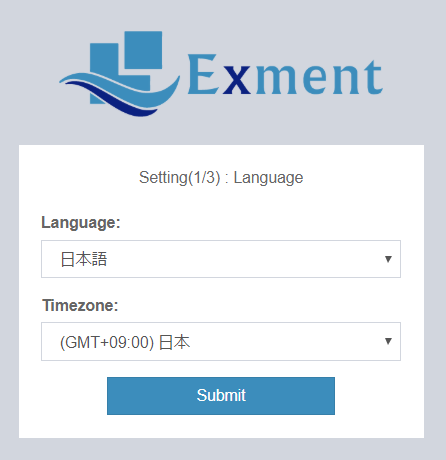
Set the database.
Please change the following contents according to your environment.
Database type
Database host name
Database port number
Database name for Exment
Database user name for Exment
Database password for Exment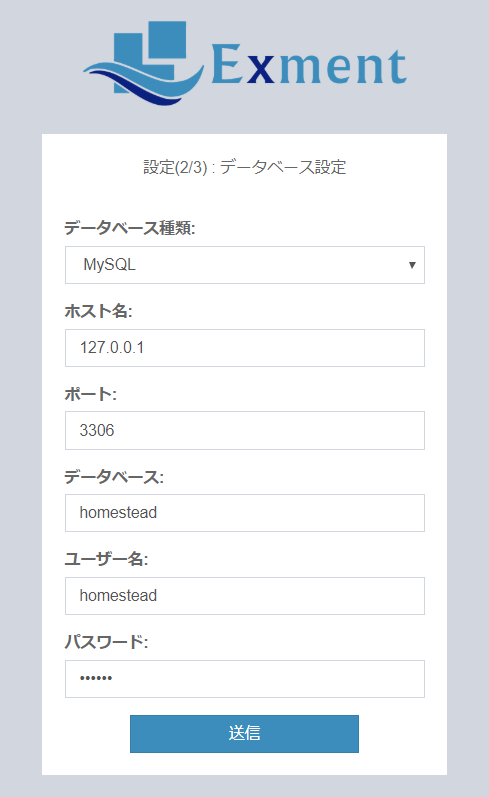
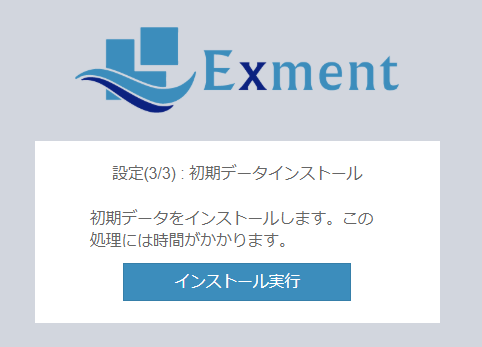
- Click Run Installation.
Optional: password hashing cost
Passwords are hashed with bcrypt, and the cost (rounds) is 12 by default. To change it, addBCRYPT_ROUNDSto ".env". See manual installation for an example.
Setting completed
After the quick start is complete, continue with Initial Settings.
Other initial settings
With the above work, it is possible to start Exment, but additional settings may be required to use some functions. Please check the link below.