Plugin (batch)
You can execute your own process at regular intervals or at the timing specified by the administrator.
We recommend that you use this plugin if you want to add your own processes that are always executed every day.
How to make
The creation procedure is described using an example of a batch called "Physically delete data that has been logically deleted".
※ In the Exment standard, data deleted from the screen is called "logical deletion" and remains in the database.
This is a batch to completely delete this data.
Create config.json
- Create the following config.json file.
{
    "uuid": "b5c0a5d2-2716-4161-98d0-b490c1ebc521",
    "plugin_name": "harddelete_data",
    "plugin_view_name": "Physically delete data",
    "description": "Permanently delete all data that has been logically deleted.",
    "author":  "Kajitori",
    "version": "1.0.0",
    "plugin_type": "batch",
    "batch_hour": 0,
    "batch_cron": "0 0 * * *"
}- plugin_name: The plugin name. Please fill in alphanumeric characters.
- uuid: 32 characters + hyphen, total of 36 characters. Used to make the plugin unique. Please create from the following URL etc. https://www.famkruithof.net/uuid/uuidgen
- plugin_type: Enter batch.
- batch_hour (optional): It is the timing to execute the plugin every day. Fill in an integer from 0 to 23.
- batch_cron (optional): For advanced users. You can enter the timing of daily plugin execution in cron notation.
You can flexibly specify when to launch a batch.
※ You can change batch_hour and batch_cron later on the screen. By setting in config.json, you can set the initial value after uploading.
PHP file creation
- Create the following PHP file. The name should be "Plugin.php".
<?php
namespace App\Plugins\HarddeleteData;

use Exceedone\Exment\Services\Plugin\PluginBatchBase;
use Exceedone\Exment\Model\CustomTable;

class Plugin extends PluginBatchBase{
    /**
     * execute
     */
    public function execute() {
        $tables = CustomTable::all();

        foreach($tables as $table){
            $modelname = getModelName($table);
            if(!isset($modelname)){
                continue;
            }

            $modelname::onlyTrashed()
                ->forceDelete();
        }
    }

}
namespace should be App \ Plugins \ (plugin name).
When the conditions of the trigger registered in the plugin management screen are met, the plugin is called and the execute function in Plugin.php is executed.
The Plugin class inherits from the class PluginBatchBase.
Compress to zip
Compress the above two files into a zip with the minimum configuration.
- HarddeleteData.zip
- config.json
- Plugin.php
Upload
Upload the plugin.
- Please refer to the plug-in for how to upload.
- In the case of batch processing, immediately after uploading, the valid flag is set to "invalid" and it is set to not be executed automatically. If you want to change it, switch the valid flag from the plug-in.
- In addition to this setting, task schedule settings are required.
For more information here please check the.
How to start a batch
There are several ways to launch an uploaded batch.
Batch execution time (hour) specification
It can be set by inputting 0 to 23 on the plug-in setting screen.
Every day, the plugin runs at the times listed above. (Example: When "5" is set, plug-in is executed at 5:00 every day)
Batch execution cron specification
For advanced users. You can enter the timing of daily plugin execution in cron notation.
※ If you enter this setting, the above "Batch execution time (hour)" will be invalid. 
Command execution
You can also run the batch manually at any time using the command line.
Execute one of the following commands.
# Specify plugin ID
php artisan exment:batch 1

# specify plugin_name (plugin name)
php artisan exment:batch --name=harddelete_data

# # specify uuid
php artisan exment:batch --uuid=b5c0a5d2-2716-4161-98d0-b490c1ebc521
※ In the case of command execution, it can be executed even if the valid flag is set to "invalid".
Sample plugin
Physical deletion plug-in for data
- A batch that physically deletes logically deleted data.
- It is a batch that fetches the information stored in the external database into the table of Exment at once.
- As a preliminary preparation, perform the following processing.
- Import Template from Exment menu "Administrator Settings" → "Templates".
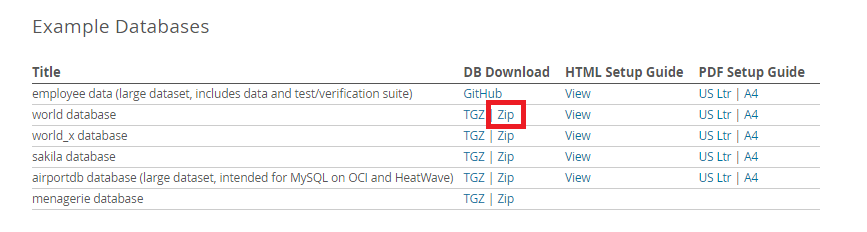
- Create an external database. This plug-in uses the MySQL sample database "world".Download the zip from the Official website and execute the unzipped SQL in your MySQL (or MariaDB) console.
- Upload Plugins from Exment menu "Administrator Settings" → "Plugins".
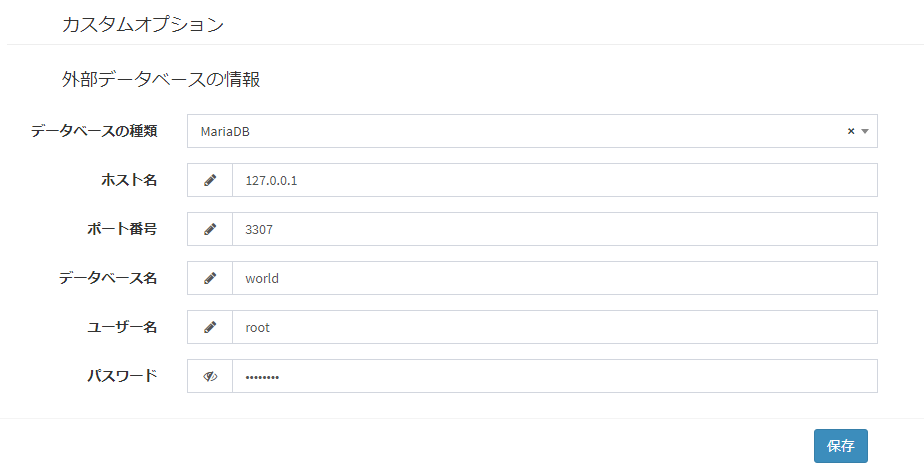
- Open the plugin setting page, fill the connection information of the external database (set in 2.) and save.