Plugin (event)
It is executed when a specific operation is performed on the screen of Exment, and processing such as updating the value can be performed.
This feature was added in v3.2.0.
Event type
| Name | Type | Description |
|---|---|---|
| loading | At the start of loading | At the beginning of the page load process, the process starts. |
| saving | Immediately before saving | Immediately before saving the data, the process starts. |
| saved | After saving | After saving the data, the process starts. |
| deleted | After deleted | After deleting the data, the process starts. |
| workflow_action_executing | Immediately before workflow execution | Immediately before workflow execution, the process starts. |
| workflow_action_executed | After workflow execution | After workflow execution, the process starts. |
| notify_executing | Immediately before notification execution | Immediately before notification execution, the process starts. |
| notify_executed | After executing the notification | After executing the notification, the process starts. |
How to make
Create config.json
- Create the following config.json file.
{
    "plugin_name": "PluginDemoEvent",
    "uuid": "fa7de170-992a-11e8-b568-0800200c9a66",
    "plugin_view_name": "Plugin Event",
    "description": "A test to execute a plugin event.",,
    "author": "(Your Name)",
    "version": "1.0.0",
    "plugin_type": "event",
    "event_triggers": "loaded",

}- Enter plugin_name in half-width alphanumeric characters.
- uuid is a string of 32 characters + hyphen, for a total of 36 characters. Used to make the plugin unique. Please create from the following URL. https://www.famkruithof.net/uuid/uuidgen
- Enter event for plugin_type.
- When specifying event_triggers from the beginning, enter the names of "trigger types" separated by commas.
- When specifying target_tables from the beginning, enter the table names of the custom table separated by commas.
PHP file creation
- Create a PHP file like the one below. Name it "Plugin.php".
<? php
namespace App \ Plugins \ PluginDemoEvent;

use Exceedone \ Exment \ Services \ Plugin \ PluginEventBase;
class Plugin extends PluginEventBase
{
    / **
     * Plugin Trigger
     * /
    public function execute ()
    {
        \ Log :: debug ('Event called!');
        return true;
    }
}
The namespace should be ** App \ Plugins \ (Pascal case of plugin name) **. Click here for details
If the trigger conditions registered on the plugin management screen are met, the plugin will be called and the execute function in Plugin.php will be executed.
The Plugin class inherits from the class PluginEventBase.
PluginEventBase owns properties such as the calling custom table $ custom_table, table value $ custom_value, etc.
A value is assigned to that property when the execute function is called.
For more information on properties, see Plugin Reference (plugin_reference.md).
Compress to zip
Compress the above two files into a zip with the minimum configuration.
The zip file name should be "(plugin_name) .zip".
- PluginDemoEvent.zip
- config.json
- Plugin.php
- (Other necessary PHP files, image files, etc.)
Sample plugin
- This is a sample that links with an external database when custom data is saved.
- If you add / update / delete in the city table of Exment, it will be reflected in the city table of the external database.
- As a preliminary preparation, perform the following processing.
- Import Template from Exment menu "Administrator Settings" → "Templates".
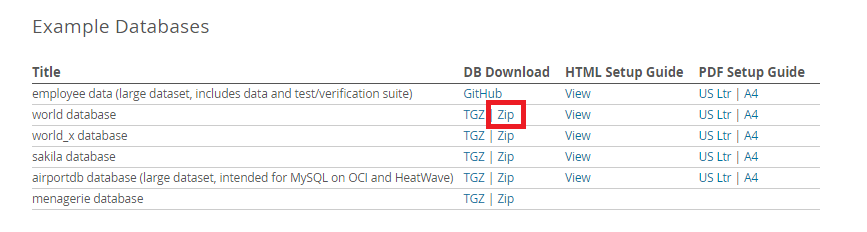
- Create an external database. This plug-in uses the MySQL sample database "world".Download the zip from the Official website and execute the unzipped SQL in your MySQL (or MariaDB) console.
- Upload Plugins from Exment menu "Administrator Settings" → "Plugins".
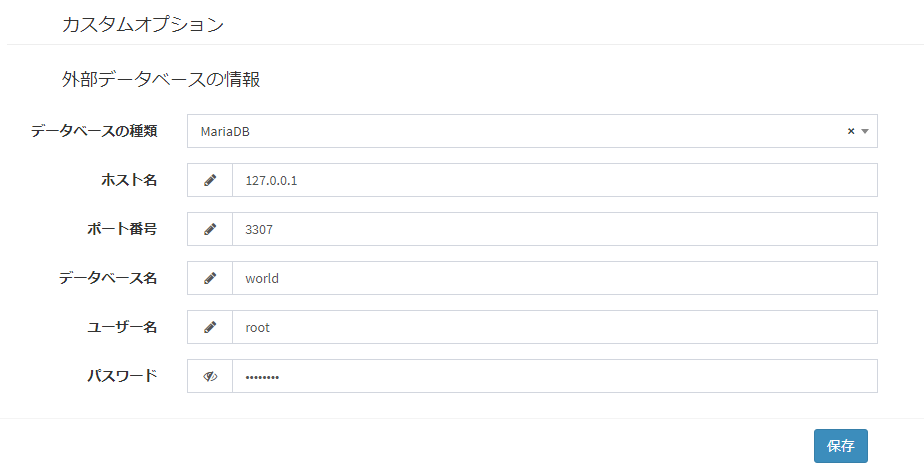
- Open the plugin setting page, fill the connection information of the external database (set in 2.) and save.