
File sharing
Share folders and files in a workspace per team, with permissions per folder, versions, previews and a trash. It works like a document library of Box or SharePoint.
The files are kept where Exment keeps its files (local, S3, Azure, FTP and so on, as set now).
※This feature is available in Exment v7.2.1 or later.
Getting started
File sharing is off at first. When a system administrator turns "File sharing" on in "Admin Setting" > "Feature Management", "File sharing" appears in the side menu. Who may use it (role groups) is also chosen in Feature Management.
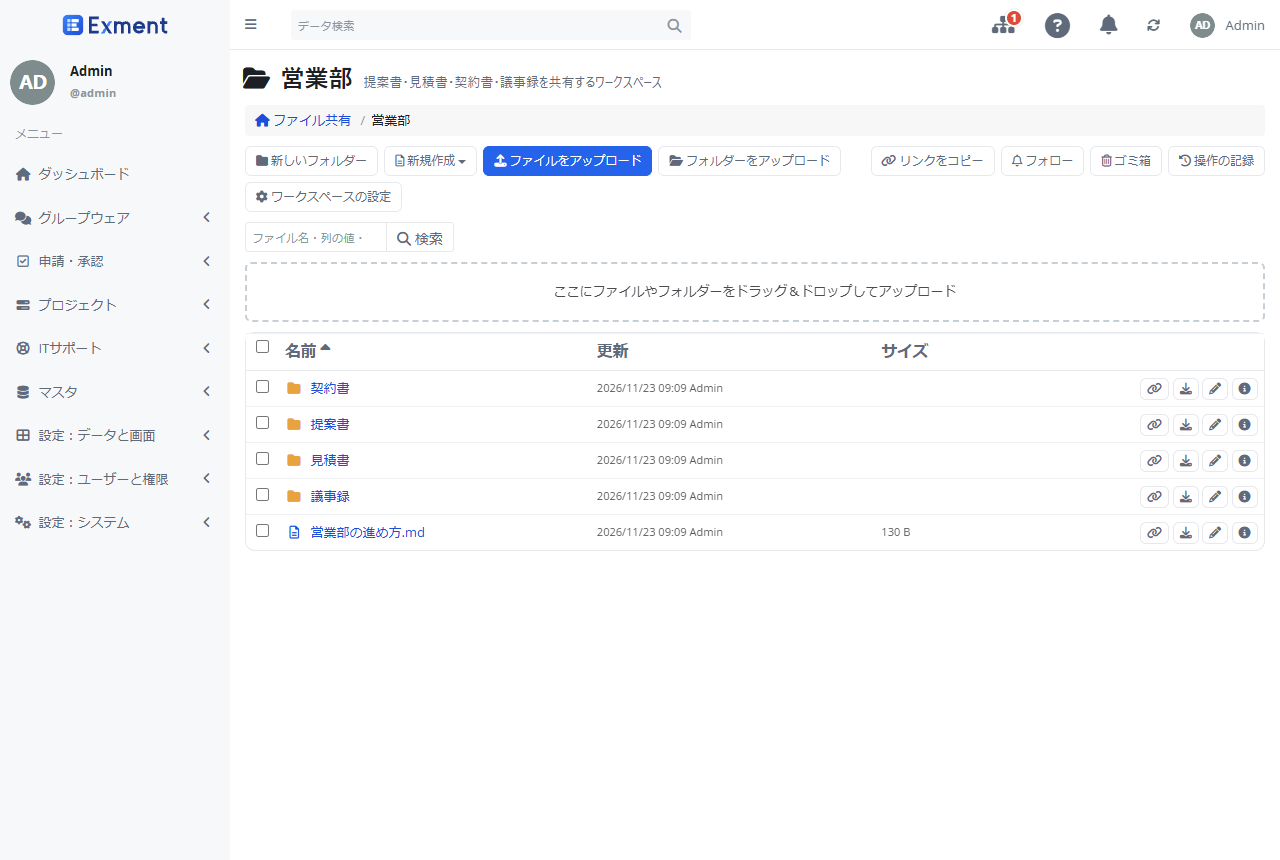
Workspaces
A workspace is where a team keeps its files (a site in SharePoint).
- Make one with "New workspace". The user who makes it becomes its manager. Who may make workspaces is set with
EXMENT_FILE_SERVER_WORKSPACE_CREATEin.env(admin: system administrators only,all: everyone). - In "Workspace settings", decide:
| Item | Content |
|---|---|
| Name, description | The name and description of the workspace. |
| Members | Users and organizations with their permission (View, Upload, Edit, Manage). At least one manager is needed. |
| Space limit (GB) | Empty for no limit. Older versions and the trash count too. |
| Days in the trash | Files are deleted for good after these days. 0 keeps them until they are deleted by hand. |
| Versions kept | How many older versions of a file are kept. |
| Columns (metadata) | Columns for the files of this workspace. See "Columns (metadata)" below. |
The top shows the workspaces you can open, "Favorites", "Files changed lately" and "Shared with me".
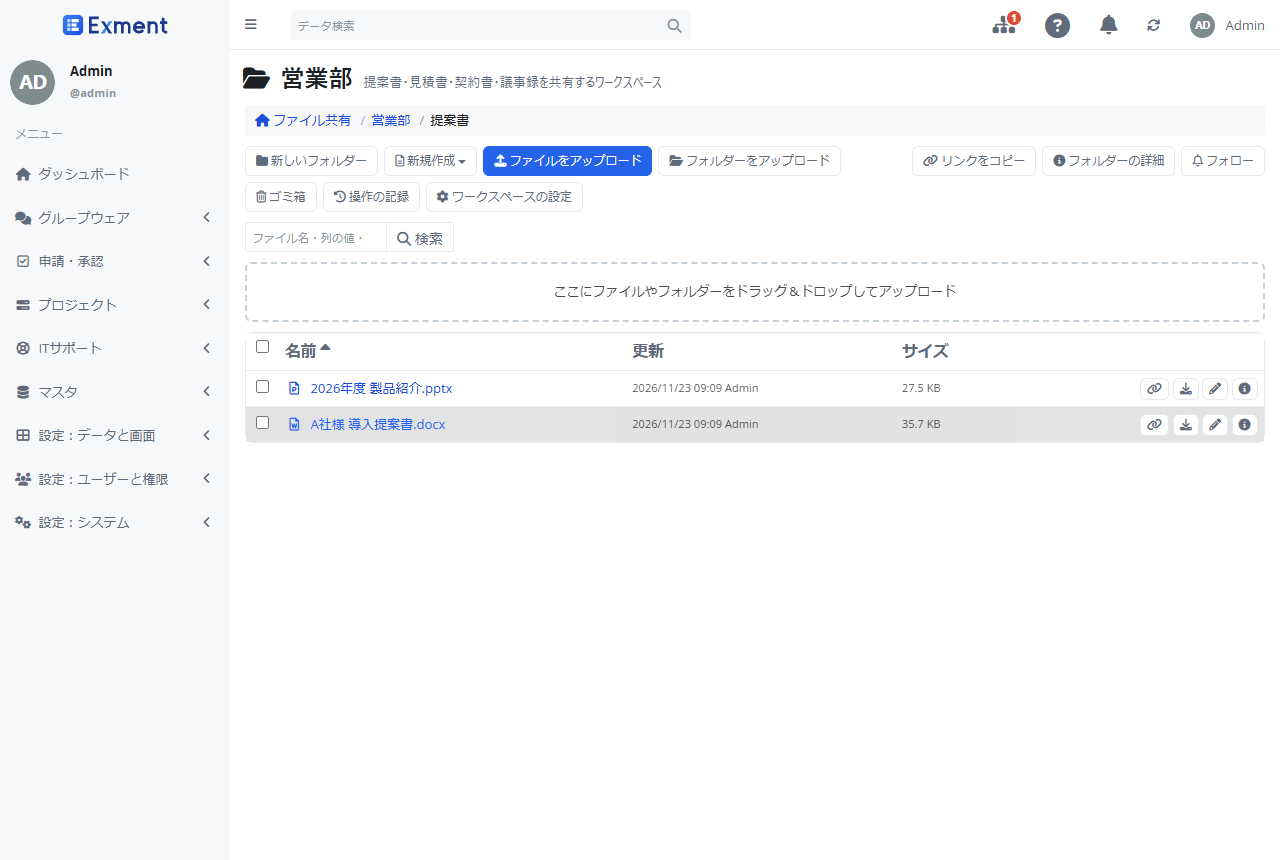
Folders and files
- Use "New folder", "Upload files", "Upload a folder", or drag and drop. Large files are sent in parts, so an upload that breaks off goes on from where it stopped.
- A file or folder can be renamed, moved, copied, downloaded (several as a ZIP), deleted and added to favorites.
- Deleted items go to the "Trash", where they can be restored ("Restore") or deleted for good ("Delete for good").
Permissions
There are four permissions. A higher one can do all that the lower ones can.
| Permission | What it allows |
|---|---|
| View | See and download |
| Upload | Add files |
| Edit | Rename, move, delete, upload new versions, make share links |
| Manage | Change permissions, discard a check out, approve |
- Folders and files take the permissions of their parent folder (or the workspace).
- "Stop inheriting permissions" gives a folder or file permissions of its own; "Inherit permissions" puts it back.
- System administrators can manage all workspaces.
Versions and checkout
- Uploading a file with the same name, or "Upload a new version", makes a new version. In "Version history", download an older version, or "Restore this version" to save its content as a new version.
- "Check out" stops others from changing or deleting the file until you "Check in". Users with Manage can "Discard check out".
Previews
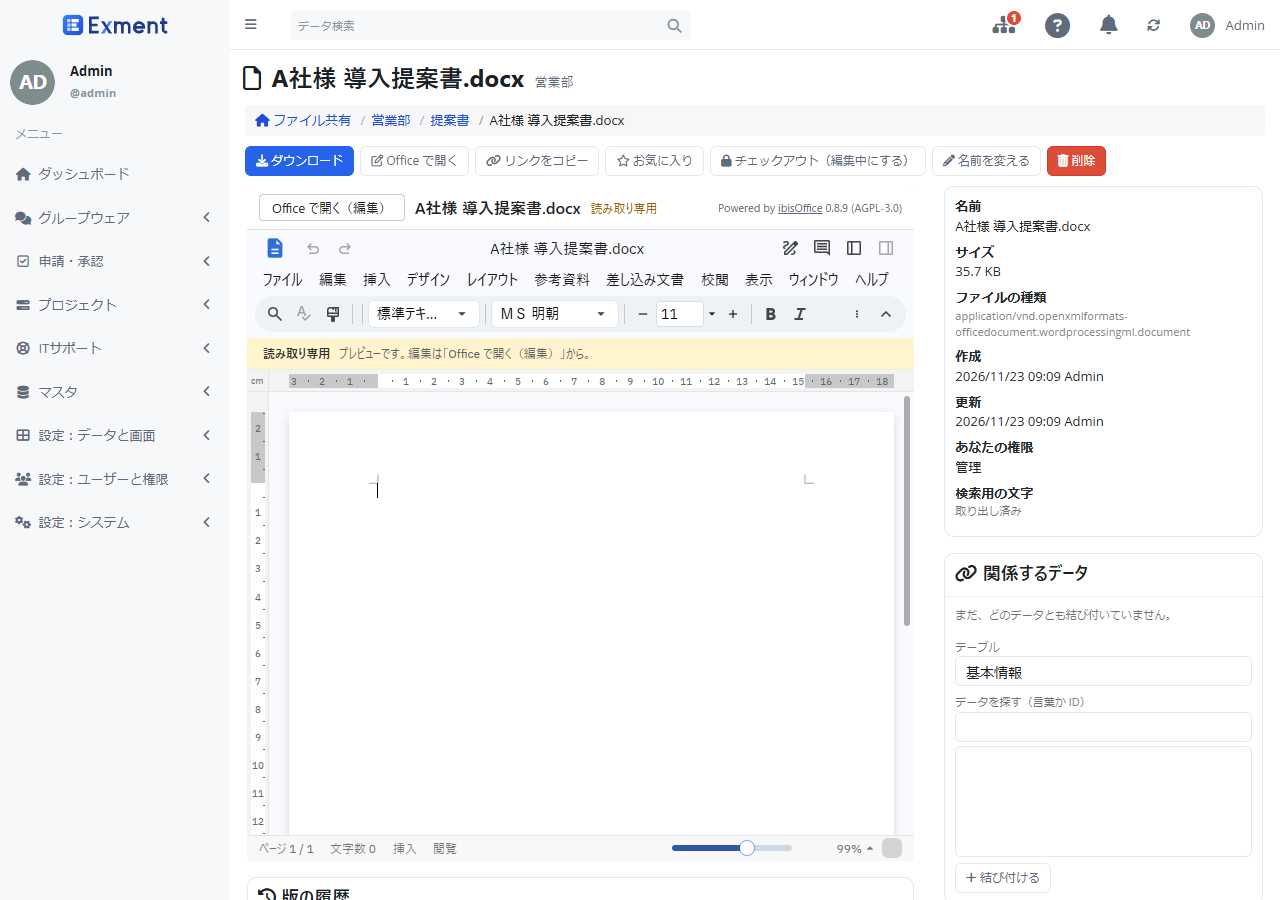
Images, video, audio, PDF and text are shown on the page. How Office files (docx, xlsx, pptx) are shown depends on the server.
| On the server | Office files |
|---|---|
LibreOffice (EXMENT_FILE_SERVER_SOFFICE_PATH) | Shown as a PDF. |
| The official plugin "Groupware" | "Open in Office" opens it read-only in the browser's Office (ibisOffice). With LibreOffice too, tabs switch between them. |
| Neither | Only the text in the file is shown. Download it to see the layout. |
With Groupware's ibisOffice, neither LibreOffice nor Docker is needed, and it works on rental servers. For the setup and the web server settings, see Groupware.
※html, svg and similar files are not shown on the page for safety; they can only be downloaded.
※Files that came in through a request link get no preview and no text extraction when they are opened. They are made only when a user with Manage presses "Make the preview".
Share links for people outside
Give files and folders to people outside who do not log in, or receive files from them. Make links in "Share links for people outside" on the page of a file.
| Kind | Content | Who can make it |
|---|---|---|
| Share link (people outside see and download) | A folder shows what is in it. Without "Allow the download", it is preview only. | Users with Edit |
| Request link (people outside upload) | People outside put files in a folder. They cannot see others' files. A file with the same name is not overwritten: it becomes "name (2)". | Users with Edit (from 7.2.1; links made before by users with Upload only stop opening) |
- A link can have an expiry date, a password and a number of times it can be opened. A password has 8 characters or more (
EXMENT_FILE_SERVER_SHARE_PASSWORD_MIN). "Take back" stops it at any time. - An invalid link (expired, revoked, opened too many times and so on) always shows "The link cannot be opened".
- A new share link ends in 30 days by default, and in 90 days at most (
EXMENT_FILE_SERVER_SHARE_DEFAULT_DAYS,EXMENT_FILE_SERVER_SHARE_MAX_DAYS; 0 = no default, no limit). Older links without an end are marked "No end" in the link list. - The address of a share link is shown only to the user who made it and to the users with Manage on the file or folder.
- For people inside, use "Copy the internal link": only those who may see the file can open it.
- To turn share links off, set
EXMENT_FILE_SERVER_EXTERNAL_SHARE=falsein.env. The longest period can be changed withEXMENT_FILE_SERVER_SHARE_MAX_DAYS. - Share links (
/share/...) are for people outside, so the web IP filter of the system settings is not applied to them by default. To let them open only from inside, setEXMENT_FILE_SERVER_SHARE_WEB_IP_FILTER=truein.env. It is read when the routes are made: a site that usesphp artisan route:cacheruns it again after the change.
Columns (metadata)
In the workspace settings, make columns for the files (as "Customer" or "Kind").
- Types: text, multi-line, number, date, choice, multiple choice, yes/no. Each can be required, have a default and be shown in the list.
- The list can be filtered by a column (also "empty"), sorted and grouped.
Links to data
In "Related data" on the page of a file, link it to records of Exment tables (as a customer). The page of the record shows a "File sharing files" box. Both show only what the user may see.
Search
"Search" finds files by name, column values and the text in the files. Only files the user may see are shown.
- Text is taken from text, HTML, Office (docx, xlsx, pptx) and OpenDocument files. PDF needs pdftotext (
EXMENT_FILE_SERVER_PDFTOTEXT_PATH); images and scanned PDFs need tesseract (EXMENT_FILE_SERVER_OCR_PATH). - The database is searched by default. With
EXMENT_FILE_SERVER_MEILI=true, Meilisearch is used (with its own indexexment_files, apart from the index of the data).
Approvals, legal hold and retention
| Feature | Content |
|---|---|
| Approval | With "approval needed" in the "Rules" of a folder, files put there are "Waiting for approval". Until then only the uploader and the managers see them. A user with Manage chooses "Approve" or "Send back". |
| Legal hold | On a workspace, folder or file, nothing can be deleted, and older versions stay. Only system administrators can set or clear it (users with Manage see it only). |
| Retention | With days set in the workspace settings, a file cannot be deleted for those days. Only system administrators can set or clear it (users with Manage see it only). |
| Who may download | Users below the chosen permission can only view (see "View only" below). |
| Watermark | The name of the viewer and the time are shown over the preview. |
| Audit log | Views, downloads, uploads, deletions, permission changes, share links and more are logged, and can be exported to CSV. |
| Follow, comments | When a followed workspace, folder or file changes, a bell notice and mail are sent. @user code in a comment notifies that user. |
View only
For users below "Who may download" of the workspace, and for share links without "Allow download", files are shown like this.
| File | How it is shown |
|---|---|
| Images | As a smaller copy. |
| Office, PDF | Through the converted PDF, when there is one. |
| Text, video, audio | Not shown. |
Each view is written to the audit log.
Server
- Daily job: files kept in the trash past their days are deleted by
php artisan exment:file-server-purge(daily at 3:30). Set up the task schedule. - Queue: thumbnails, previews and text extraction run on the queue.
- Extract text again:
php artisan exment:file-server-indexextracts the text of files not done yet and rebuilds the Meilisearch index. - Other software (all optional): LibreOffice (Office previews), pdftotext (text of PDF), tesseract (OCR), Meilisearch (faster search).
- LibreOffice without the network: Office files may load URLs from outside. Put a command before LibreOffice in
EXMENT_FILE_SERVER_SOFFICE_PREFIXto convert without the network (e.g.unshare -rn,firejail --net=none --quiet). Check first that the command works on the server. - Upload limits: large files are sent in parts. A file is up to 2 GB (
EXMENT_FILE_SERVER_MAX_FILE_SIZE), a user may have up to 20 uploads not finished (EXMENT_FILE_SERVER_MAX_UPLOADS), up to 10 GB together (EXMENT_FILE_SERVER_MAX_UPLOAD_BYTES). Uploads not finished count toward the space of the workspace. One with nothing sent for 60 minutes is not counted, and is removed when the user starts another.
Main settings (.env)
| Setting | Default | Content |
|---|---|---|
EXMENT_FILE_SERVER_WORKSPACE_CREATE | admin | Who may make workspaces (admin, all) |
EXMENT_FILE_SERVER_MAX_FILE_SIZE | 2147483648 (2 GB) | Max size of a file (bytes; 0 = no limit; 2 GB from 7.2.1) |
EXMENT_FILE_SERVER_MAX_UPLOADS | 20 | Uploads a user may have not finished |
EXMENT_FILE_SERVER_MAX_UPLOAD_BYTES | 10737418240 (10 GB) | Bytes of a user's uploads not finished, together (0 = no limit) |
EXMENT_FILE_SERVER_EXTERNAL_SHARE | true | Whether share links are used |
EXMENT_FILE_SERVER_SHARE_DEFAULT_DAYS | 30 | Default days of a new share link (0 = no default) |
EXMENT_FILE_SERVER_SHARE_MAX_DAYS | 90 | Max days of a share link (0 = no limit, links without an end allowed) |
EXMENT_FILE_SERVER_SHARE_PATH | share | The first part of the URL of a share link |
EXMENT_FILE_SERVER_SHARE_PASSWORD_MIN | 8 | The shortest password of a share link |
EXMENT_FILE_SERVER_SHARE_WEB_IP_FILTER | false | Whether share links take the web IP filter too |
EXMENT_FILE_SERVER_SOFFICE_PATH | none | Where LibreOffice (soffice) is |
EXMENT_FILE_SERVER_SOFFICE_PREFIX | none | A command put before LibreOffice (to run it without the network) |
EXMENT_FILE_SERVER_PDFTOTEXT_PATH | none | Where pdftotext is |
EXMENT_FILE_SERVER_OCR_PATH | none | Where tesseract is |
EXMENT_FILE_SERVER_MEILI | false | Whether Meilisearch is used |
EXMENT_FILE_SERVER_AUDIT | true | Whether the audit log is kept |
EXMENT_FILE_SERVER_NOTIFY | true | Whether follow notices are sent |