
Plugin(View)
You can create and add new designs and unique features to Exment's custom data list screen.
Please use it when you want to use a completely different function from the standard View, List / Aggregation / Calendar View.
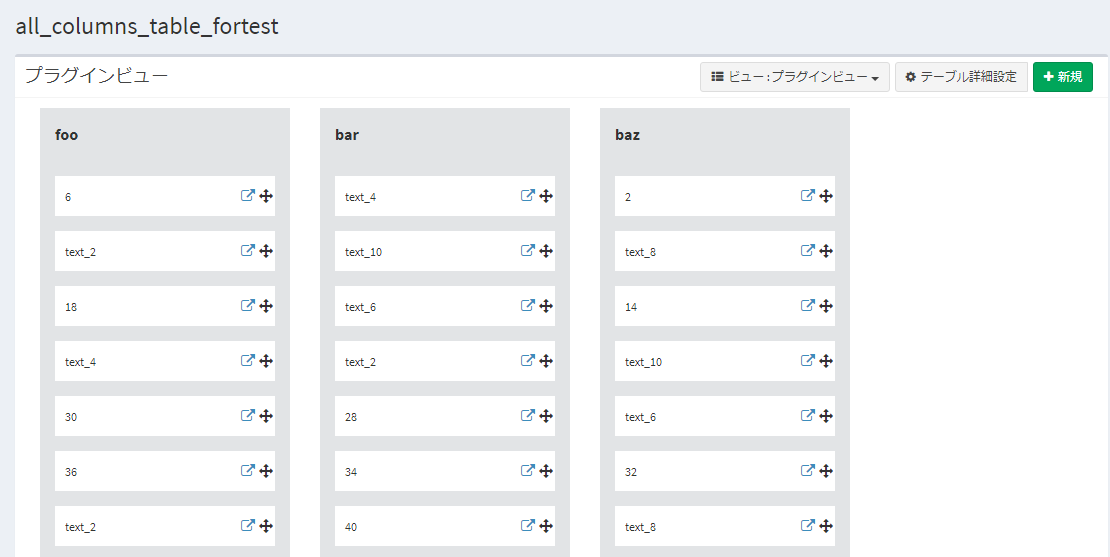
Introduction
The Exment Plugin page was developed using the PHP framework Laravel and the admin library exment-admin-core (based on laravel-admin / open-admin; laravel-admin in v6.x or earlier). increase...
When developing a page, we recommend that you develop it especially if you have knowledge of Laravel.
Custom View Main specifications
- You can display your own functions and screens on the custom data list screen.
- View settings can be freely added by the Plugin developer. As with any standard View, you can individually configure View-specific settings on the View Settings screen.
- Like other standard views, you can create multiple views, so even with the same view, for example, "View A displays all data" and "View B displays only data with a valid flag of YES". You can make settings such as.
Difference between page and view
One way to create your own page is Plugin(page).
The main differences between Plugin (page) and Plugin (View) are as follows.
Plugin(Page)
- Basically, it creates a completely independent page without being tied to a specific table.
- When you install the Plugin, you will be able to access the screen unique to the Plugin.
- Since it is not tied to a specific table, you can join multiple tables and conversely create a page that is completely unrelated to Exment's custom data.
Plugin(View)
- The created Plugin screen is displayed on the list screen of a specific table.
- Similar to the standard View, List / Aggregation / Calendar View, the administrator or user can add a View to display the Plugin's own screen.
- You can join multiple tables or, conversely, create a page that is completely unrelated to the Exment's custom data, but basically it will display the screens related to the data in the selected table.
How to make
Sample
Here, as a sample, create the following page.
- Display a simple Kanban View that creates a Kanban task for each category.
- The column corresponding to "Category" can be selected as appropriate in the View settings. This allows multiple tables to use the same Plugin.
Create config.json
- Create the following config.json file.
{
    "plugin_name": "KanbanView",
    "plugin_view_name" : "Kanban View",
    "description": "Display Kanban View.",
    "uuid":  "4880a5c5-eced-60f4-0ac5-d2d672f63bea",
    "author":  "(Your Name)",
    "version": "1.0.0",
    "plugin_type": "view",
    "route": [
        {
            "uri": "update",
            "method": [
                "post"
            ],
            "function": "update"
        }
    ]
}- Enter plugin_name in single-byte alphanumerical characters.
- uuid is a string of 32 characters + hyphen, for a total of 36 characters. Used to make the Plugin unique. Please create from the following URL.
https://www.famkruithof.net/uuid/uuidgen - Enter view for plugin_type.
- route defines a list of URL endpoints to execute, their HTTP methods, and methods in Controller.
Basically, View only displays the list screen, so you do not need to set the route. However, if you want to perform asynchronous request / response by ajax, please implement the definition.
- uri: This is a uri for page display. The actual URL will be "http(s)😕/(Exment URL)/plugins/(URL set on the Plugin management screen)/(specified uri)".
- method: HTTP method. Please fill in with get, post, put, delete.
- function: Method in Controller to execute
- Example: If the URL set on the Plugin management screen is "youtube_search", the uri specified in config.json is "list", and the specified method is "get", "http(s)😕/(Exment URL)/plugins/youtube_search/list (method: GET) ".
Note: the URLs are for the default without "/admin" (a site newly installed with v7.2.1 or later). If
ADMIN_ROUTE_PREFIXin.envhas a value (an older site has "admin"), add it after the URL of the site (e.g.http(s)://(Exment URL)/admin/oauth/token). For details, see Change / delete "admin" included in URL.
Plugin file creation
Main logic creation
Create a PHP file like the one below. The file name should be "Plugin.php".
<?php

// (1)
namespace App\Plugins\KanbanView;

use Exceedone\Exment\Services\Plugin\PluginViewBase;
use Exceedone\Exment\Enums\ColumnType;
use Exceedone\Exment\Model\CustomColumn;

class Plugin extends PluginViewBase
{
    // (3) Comment out if you want to add Plugin-specific settings
    // protected $useCustomOption = true;

    /**
     * (2) Method when displaying a list. "grid" fixed
     */
    public function grid()
    {
        $values = $this->values();
        // (5) Call View
        return $this->pluginView('sample', ['values' => $values]);
    }

    /**
     * (2) This Plugin's own endpoint
     */
    public function update(){
        $value = request()->get('value');

        $custom_table = CustomTable::getEloquent(request()->get('table_name'));
        $custom_value = $custom_table->getValueModel(request()->get('id'));

        $custom_value->setValue($value)
            ->save();

        return response()->json($custom_value);
    }

    /**
     * (3) Options to display on the View settings screen
     * Set view option form for setting
     *
     * @param Form $form
     * @return void
     */
    public function setViewOptionForm($form)
    {
        // When adding your own settings
        $form->embeds('custom_options', 'Detail settings', function($form){
            $form->select('category', 'category column')
                ->options($this->custom_table->getFilteredTypeColumns([ColumnType::SELECT, ColumnType::SELECT_VALTEXT])->pluck('column_view_name', 'id'))
                ->required()
                ->help('Please select a category column. Corresponds to the Kanban board. Custom column types "Choice" and "Choice (value, heading)" are displayed as candidates.');
        });

        // When setting the filter (narrowing down)
        static::setFilterFields($form, $this->custom_table);

        // When setting the sort
        static::setSortFields($form, $this->custom_table);
    }


    /**
     * (4) Options to set on the Plugin edit screen. Set common to all views
     *
     * @param [type] $form
     * @return void
     */
    public function setCustomOptionForm(&$form)
    {
        // Add if needed
        // $form->text('access_key', 'Access key')
        //     ->help('Please enter your YouTube access key.');
    }


    // Below, the processing required for Kanban View ----------------------------------------------------

    protected function values(){
        $query = $this->custom_table->getValueQuery();

        // Perform data filtering
        $this->custom_view->filterModel($query);

        // Sort data
        $this->custom_view->sortModel($query);

        // Get value
        $items = collect();
        $query->chunk(1000, function($values) use(&$items){
            $items = $items->merge($values);
        });

        $boards = $this->getBoardItems($items);

        return $boards;
    }


    protected function getBoardItems($items){
        $category = CustomColumn::getEloquent($this->custom_view->getCustomOption('category'));
        $options = $category->createSelectOptions();

        // set boards
        $boards_dragTo = collect($options)->map(function($option, $key){
            return "board-id-$key";
        })->toArray();

        $boards = collect($options)->map(function($option, $key) use($category, $boards_dragTo){
            return [
                'id' => "board-id-$key",
                'column_name' => $category->column_name,
                'key' => $key,
                'title' => $option,
                'drapTo' => $boards_dragTo,
                'item' => [],
            ];
        })->values()->toArray();

        foreach($items as $item){
            $c = array_get($item, 'value.' . $category->column_name);

            foreach($boards as &$board){
                if(!isMatchString($c, $board['key'])){
                    continue;
                }

                $board['item'][] = [
                    'id' => "item-id-$item->id",
                    'title' => $item->getLabel(),
                    'dataid' => $item->id,
                    'table_name' => $this->custom_table->table_name
                ];
            }
        }

        return $boards;
    }
}
(1) The namespace should be App\Plugins\(Pascal case of Plugin name). Click here for details
Also, set the class name to "Plugin" and inherit PluginViewBase.(2) The public method name when the list screen is displayed is fixed to grid.
(3) In addition, when creating an additional endpoint, describe the public method name in the class with the name described in function of config.json.
(4) The function "public function setViewOptionForm (&$form)" is an item displayed on the View setting screen.
Since this setting can be set individually for each View, it is possible to make settings such as "Display all data in ViewA" and "Display only data with the valid flag YES in View B" even in the same View. increase.There are two types, "Filter condition" and "Sort setting", which are prepared by Plugin's own setting and Exment standard function.
- To get the set value, use the function "$ this->custom_view->getCustomOption('parameter name')".
- Also, when using the column settings used in View, which is a standard function of Exment, describe as follows.
(5) The function "public function setCustomOptionForm (&$form)" is an item displayed on the Plugin setting screen.
This setting is commonly used for all views.- To use custom settings, add "protected $ useCustomOption = true;".
- To get the set value, use the function "$ this->plugin->getCustomOption('parameter name')".
(6) When using View, use the function "$this->pluginView".
(7) If you want to get the endpoint of the Plugin, use the function "$this->getRouteUri('endpoint name')".
- If you want to get the full URL path, use admin_url ($this->getRouteUri('endpoint name')).
(Optional) About View
When separating Views, save the blade file under the folder "resources/views".
(Optional) About css, js and other static files
- Please place the css file in the folder "public/css".
- Place the js file in the folder "public/js".
- Place other files (image files, etc.) in the folder "public/assets".
- In this sample, js/css for creating Kanban View is created.
Compress to zip
Compress the above two files into a zip with the minimum configuration.
The zip file name should be "(plugin_name) .zip".
- TestPluginView.zip
- config.json
- Plugin.php
- (Other necessary PHP files, image files, etc.)