
Feature Management
Decide which features and plugins are used, who may use them, and whether their menus are shown.
Exment is used by many sites, so a new feature is off at first. Until a system administrator turns it on, it is not in the menu, and its pages cannot be opened even by their URL. Updating Exment does not change the pages or the menu of your site.
※This page is available in Exment v7.2.1 or later.
The page
Log in as a system administrator and open "Admin Setting" → "Feature Management" (the URL is /feature).
Only system administrators can open this page.
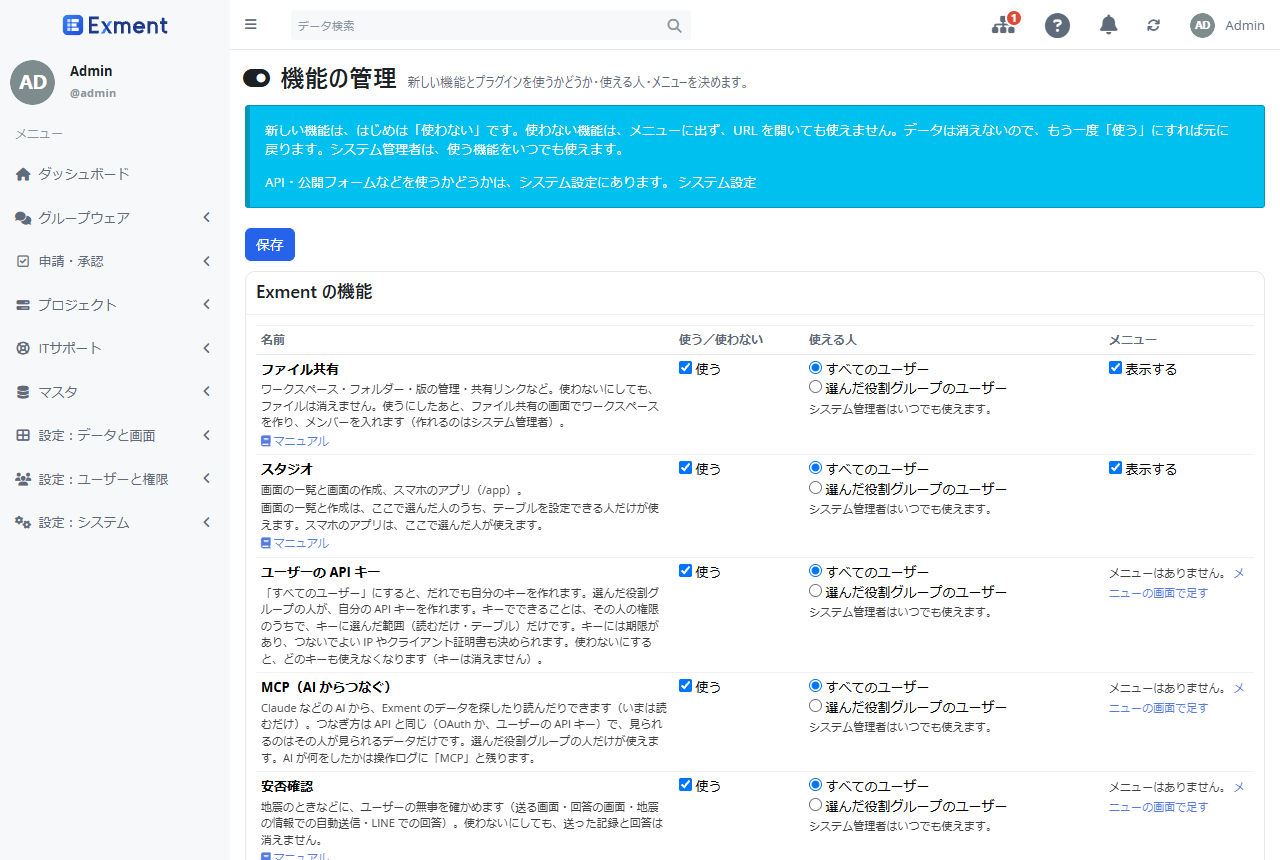
The page has two parts: "Features of Exment" at the top and "Plugins" below.
Features of Exment
New features of Exment itself:
| Name | Content |
|---|---|
| File sharing | Workspaces, folders, versions and share links. Turning it off does not remove the files. (Shown only in versions that have File sharing) |
| Studio | The list of screens, making screens, and the phone app (/app). For those who may set tables. |
| Data maintenance | Tidy the data of a table at once (for now: delete the attachments at once). For those who may set tables. (v7.3.0 and later) Data maintenance |
For each feature, decide these three.
| Item | Content |
|---|---|
| Use | Whether the feature is used on this site. It is off at first. |
| Who may use it | "All users" or "Users of the chosen role groups". With none chosen, only the system administrators can use it. System administrators can always use it. |
| Menu | Whether to "Show" it in the menu. It is shown only to those who may use it. When there is no menu row, "There is no menu row. Saving makes it." is shown. |
The "Status" column shows:
| Status | Meaning |
|---|---|
| New | No one has decided on the feature yet (it is off). |
| In use | It is on and can be used. |
| Not available in this environment | The server keeps it off (Lock features on the server). It cannot be turned on from this page. |
| It cannot be used because a feature it needs is off. | A feature that works only with another feature ("Only while "..." is used." is shown), and that feature is off. |
※Of the users chosen here, only those who may set tables can use Studio.
※Whether the API, the public forms and others are used is in the System setting as before.
Plugins
The installed plugins are on the same page.
The page does not keep a second copy of their settings: it shows the settings they already have.
| Item | Content |
|---|---|
| Use | The same as the active flag of the plugin. When it is inactive, "The plugin is inactive" is shown. To change it, use "Change it in the plugin settings" and change it on the Plugin page. |
| Who may use it | The same as the "access" permission of the plugin in the role groups. Change it on the Role group page. |
| Menu | Whether it is shown in the menu. Only this one is decided on this page. |
※A plugin of a type everyone can use, or a plugin set to "all users can use it", says so.
※When a plugin has registered features of its own (as a web mail), each of them has a row under the plugin. A feature in a plugin is off at first too. Of those who may use the plugin, the users chosen here can use it.
Free official plugins (bundled with Exment)
Exment comes with free official plugins (Project Management, IT Support and Groupware). Install them from "Free official plugins (bundled with Exment)" on Feature Management. See Official plugins.
- Nothing is installed or loaded (no tables are made) until you press "Use (install)".
- Pressing it checks the plugin, installs it and makes it active. The main features of the plugin are turned on too. After that, it is also listed under "Plugins" above, where you choose who may use it and its menu.
- When a newer version is there, "Version ... is available." is shown. It is never installed by itself: "Update to this version" updates it (settings, menus and permissions stay).
- The version before the update is kept: "Back to the previous version (...)" puts it back.
- A plugin installed manually before stays as it is (it is not installed again). Only when the bundled one is newer, it is shown. Once it is replaced by the bundled version, you cannot go back to the manual one.
- A bundled plugin is installed only after its signature by Exceed One is checked. A plugin whose signature does not match is not listed.
- On a site where the provider changes the versions (as a SaaS), "The versions are changed by the provider of this site." is shown without the buttons (
EXMENT_BUNDLED_PLUGINS_UPDATES=falsein.env).
Notices of security fixes
When a newer version of an installed official plugin includes a security fix, the system administrators are told.
- "Update available for an official plugin (...)" on the home of the system administrators. The row in Feature Management shows a "Security fix" badge and "This version includes a security fix. Press "Update to this version"."
- A bell notification, and mail on a site that can send mail, with the same subject and text, once.
- Other users see nothing. The plugin is updated only when a system administrator presses "Update to this version".
- Going back to a version without the security fix asks once more.
Notices of new features
After Exment is updated, when there are new features no one has decided on, the system administrators get a notice on the home and a bell notification, once ("There are new features (...). They are off at first. ..."). No mail is sent. A new installation shows none.
When a feature is off
- It is no longer in the menu (the menu row is hidden, not removed).
- Its pages and its API cannot be used, even when the URL is opened directly.
- Its data (workspaces, files, screens and so on) stays. Turning it on again brings everything back.
- When you save a change that stops some users from using a feature (turning it off, or choosing fewer role groups), the page asks "Some users will no longer be able to use the following. Save?".
Messages when a feature cannot be used
Opening the URL of a feature that cannot be used shows one of these messages.
| Message | When |
|---|---|
| This feature is not used on this site. | The feature is off (or the server keeps it off). System administrators also get a link to Feature Management. |
| You do not have permission to use this feature. Please ask your administrator. | The feature is on, but the user is not one of those who may use it. |
Both have a "Back to home" link. From the API, the same message comes back as JSON (404 when the feature is not used, 403 without permission).
Sites that are updated
Updating Exment keeps what the site used.
- The features the site used before the update are on, and look as before.
- File sharing: the site has at least one workspace
- Studio: someone has opened the pages of Studio or the phone app (checked in the operation log)
- A feature that only had a menu and was not used is off.
- The active flag of the plugins and the permissions of the role groups do not change.
- The features a plugin already had stay on in the sites that had the plugin before.
- A new installation starts with everything off.
- A "Feature Management" menu is added under "Admin Setting".
Lock features on the server
With EXMENT_FEATURES_LOCKED in the .env of the server, features stay off whatever the system administrators of the site choose.
Use it for a service that does not offer them (as a SaaS). Write the keys separated by commas.
EXMENT_FEATURES_LOCKED=file_server,studio| Key | Feature |
|---|---|
file_server | File sharing |
studio | Studio (with the phone app) |
A locked feature shows "Not available in this environment" on this page.
※After changing .env on a server that caches its configuration, run php artisan config:clear (or php artisan config:cache).
The order of the rules
Whether a feature can be used is decided from the top. A lower rule never opens more than the one above it.
- The server: the features in
EXMENT_FEATURES_LOCKEDcannot be used. - Use on the site: no one can use a feature that is off.
- Who may use it: all users, or the users of the chosen role groups (system administrators always may).
- The settings of the feature itself: the permissions of the tables for Studio, the permissions of a workspace for File sharing, and so on.
For plugin developers
A plugin can register its own features and get a row on this page. A registered feature is off at first.
use Exceedone\Exment\Services\Features;

// Register it, as in the constructor of the plugin class. The key starts with the uri of the plugin
Features::register('exment_groupware.mail', [
    'label' => 'Web mail',
    'endpoints' => ['plugins/exment_groupware/mail'],
]);

// Check it in the pages of the plugin
if (!Features::allowed('exment_groupware.mail')) {
    return Features::deny('exment_groupware.mail');
}- The pages in
endpointsshow the messages above when the feature cannot be used. - With
existing => true, the feature stays on in the sites that had the plugin before (for a feature the plugin already had). - With the key of another feature in
requires, the feature cannot be used while that one is off.