
(For advanced users) Using the full-text search engine (Meilisearch)
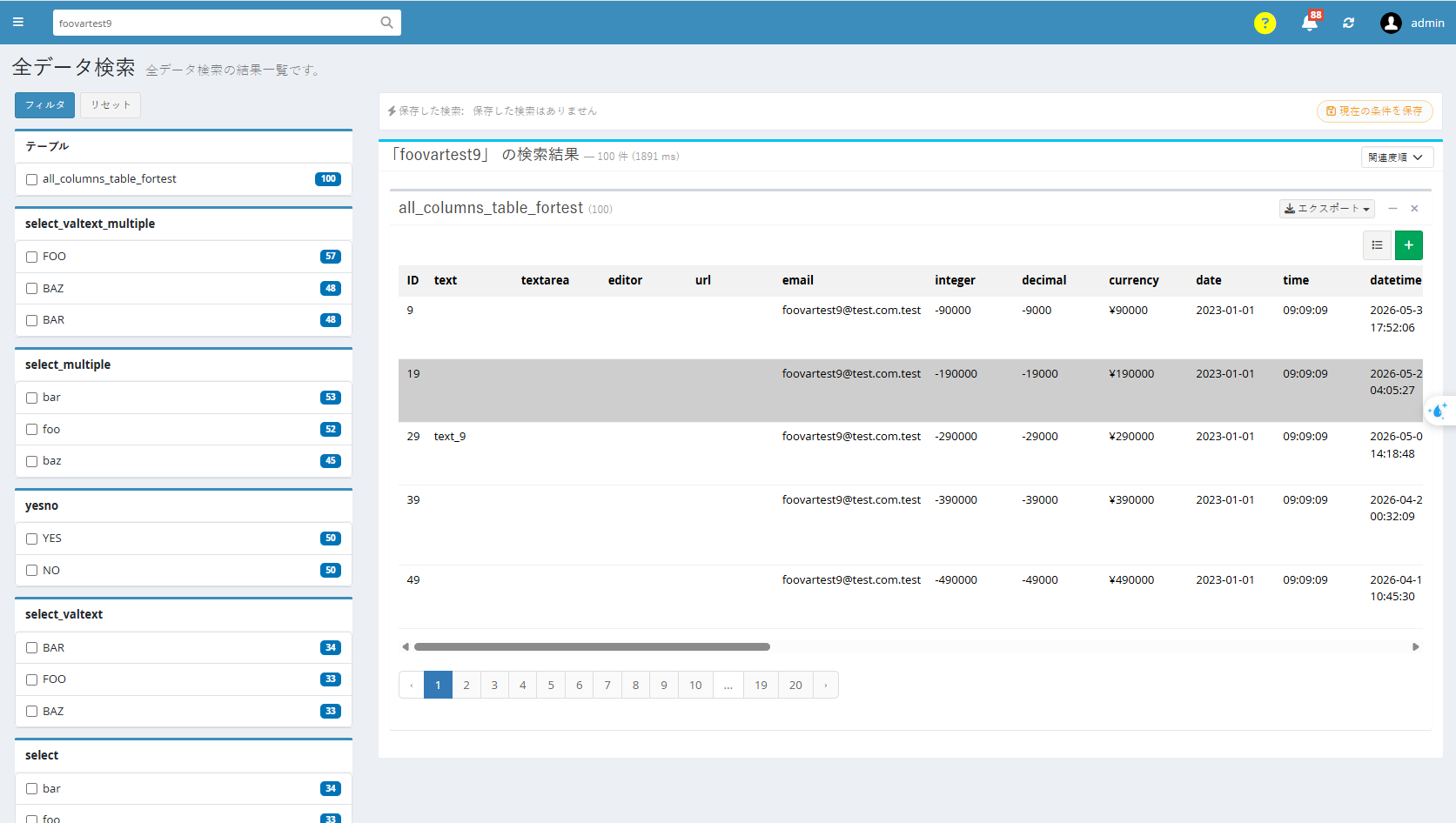
Exment normally searches against the database, but you can use the full-text search engine "Meilisearch".
As a result, searches can be performed at high speed even in an environment that holds a large amount of data.
*This function is available in Exment v7.0.0 or later.
You can use the following functions.
- Speeding up of free word search
- Narrowing down of search results (filter / facet)
- Highlighting of search keywords
- Sorting of search results (relevance / newest / oldest)
- Saving and sharing of search conditions
- Export of search results (CSV / XLSX)
- Setting of synonyms and stop words
For the standard search specifications of Exment, please check Search.
Operating conditions
When using Meilisearch, the following conditions must be satisfied.
| Item | Contents |
|---|---|
| Meilisearch server | v1.10 or later |
| PHP library | It is necessary to install "meilisearch/meilisearch-php" (v1.10 or later). The zip of the easy installation includes it. This library is not a required library of Exment. If it is not installed, the commands related to Meilisearch will result in an error, and the realtime sync will also be disabled. Also, this library requires an HTTP client compatible with "guzzlehttp/guzzle". |
| Queue | It is necessary to set "database" (or redis) to "QUEUE_CONNECTION" and to have executed the migration. Since the realtime sync is executed by the queue, if it remains the default value "sync", the process on the screen will be blocked. For details, please check Delayed execution of notification processing. |
| Custom table | Only tables whose "Search Enabled" is YES in the custom table settings, and which have a custom column whose "Freeword Search Target" is YES, become the target of index creation. |
Notes
- Meilisearch and the queue worker must keep running at all times. If Meilisearch stops, the search screen switches to the standard search using the database (while narrowing-down conditions are applied, no search results are displayed, and the sort order is not applied). If the queue worker stops, updates are no longer reflected in the index. Steps 1 and 3 register both as services that restart automatically.
- The index is held separately from the database, so the two can drift apart. Step 4 sets up the daily automatic repair.
- *When "EXMENT_SEARCH_DOCUMENT" is true, Meilisearch is not used on the search screen, even if "MEILISEARCH_GLOBAL_SEARCH" is true, because attachment file names are not indexed. The input completion of "Select (select from the list of values of another table)" is not affected.
- *Do not publish Meilisearch to the Internet. Allow connections only from the Exment server or the internal network, and keep the master key secret.
- For details on Meilisearch itself, see the official documentation.
The easy way
From Exment v7.2.2, one script does steps 1 to 4 of Installing by hand below. You can run it again at any time (the master key and the settings that are already there are kept).
For Linux
On a server with systemd (Ubuntu, Debian, RHEL, Amazon Linux and others, including AWS EC2), go to the folder of Exment and run:
cd /var/www/exment
sudo sh vendor/exceedone/exment/resources/meilisearch/install-meilisearch.sh
The script does the following.
- Installs Meilisearch ("/usr/local/bin/meilisearch"), the user that runs it, "/etc/meilisearch.conf" with a new master key (readable by root only), and the service "meilisearch" (listening on 127.0.0.1:7700 only)
- Sets up Exment ("php artisan exment:meili-setup"; see Setting up only Exment)
- Registers the queue worker as the service "exment-meili-worker"
- Adds the scheduler (php artisan schedule:run) to the crontab of the web server user
Options, when needed:
| Option | Description |
|---|---|
| --exment-dir=folder | The folder of Exment. Default: the current folder. |
| --user=user | The user the web server runs PHP as (www-data, apache, nginx...). Default: the owner of the "storage" folder. |
| --php=path | The php command. Give the same version as the web server (e.g. --php=/usr/bin/php8.3). Default: php in PATH. |
| --version=version | The Meilisearch version. Default: "v1.10.3". |
| --index=name | The index name. Default: "exment_global". |
| --no-cron | Does not add the scheduler to the crontab. Use it when the scheduler already runs in another way. |
For Windows
Open PowerShell with "Run as administrator" and run the following in the folder of Exment. *Change "C:\php\php.exe" to the php that IIS uses.
cd C:\inetpub\exment
powershell -ExecutionPolicy Bypass -File vendor\exceedone\exment\resources\meilisearch\install-meilisearch.ps1 -Php C:\php\php.exe
The script does the following.
- Installs Meilisearch ("C:\meilisearch"), a new master key ("C:\meilisearch\master-key.txt", readable by Administrators and SYSTEM only), the service "Meilisearch" with NSSM, and excludes the index folder from Windows Defender scans
- Sets up Exment ("php artisan exment:meili-setup")
- Registers the queue worker as the service "ExmentMeiliWorker"
- Registers the task "ExmentScheduler" (php artisan schedule:run every minute) in the Task Scheduler
For NSSM, give its path with "-Nssm", or put it in PATH or at "C:\nssm\nssm.exe". If neither is there and winget is, the script installs it. Other options: "-ExmentDir" (the folder of Exment), "-Version" (the Meilisearch version), "-InstallDir" (the folder of Meilisearch), "-Index" (the index name), "-NoScheduler" (does not register the task), "-NoDefenderExclusion" (does not change Windows Defender)
For Docker
With docker-exment, add "docker-compose.meilisearch.yml" and the containers of Meilisearch, the queue worker and the scheduler start.
- Write a master key of 16 characters or more in the ".env" of the docker-exment folder (e.g. the output of "openssl rand -hex 16").
EXMENT_DOCKER_MEILISEARCH_MASTER_KEY=(master key)- Start the containers and set up Exment:
docker compose -f docker-compose.yml -f docker-compose.mysql.yml -f docker-compose.meilisearch.yml up -d
docker compose -f docker-compose.yml -f docker-compose.mysql.yml -f docker-compose.meilisearch.yml exec -u www-data php php artisan exment:meili-setup
Setting up only Exment
When Meilisearch already runs (for example on another server), run the following in the folder of Exment. It does all of "2. Exment settings" of Installing by hand.
php artisan exment:meili-setup --host=http://127.0.0.1:7700 --key-file=/etc/meilisearch.confThe command does the following, in order. If a step fails, it shows the error and stops: fix it and run the command again.
- Checks that Meilisearch answers, that the master key is right and that the version is v1.10 or later
- ".env": changes "QUEUE_CONNECTION" from sync to database, and adds "MEILISEARCH_REINDEX_QUEUE=meili-reindex"
- Creates the queue tables (jobs, failed_jobs) when they are missing, and runs "php artisan migrate"
- Saves the system settings: host, master key, index name, real-time sync (YES), periodic index repair (YES), repair time
- Builds the index. When it is done, turns global search to YES
- Checks the connection ("php artisan exment:meili-health --failed") and asks the running queue workers to restart ("php artisan queue:restart")
| Option | Description |
|---|---|
| --host=URL | Where Meilisearch is. Default: the current setting ("http://127.0.0.1:7700"). |
| --key-file=file | A file with the master key: a file with a "MEILI_MASTER_KEY=" line (such as "/etc/meilisearch.conf"), or a file with the key alone. |
| --key=key | The master key. Other users may see a key written on the command line, so "--key-file" or the environment variable "MEILI_MASTER_KEY" is recommended. |
| --index=name | The index name. Default: the current setting ("exment_global"). |
| --repair-at=HH:MM | The time of the periodic index repair. Default: the current setting ("03:00"). |
| --skip-env | Does not change ".env". Write what it shows yourself. |
| --skip-index | Only saves the settings, and does not build the index. Global search stays NO. |
The master key is looked for in "--key-file", the environment variable "MEILI_MASTER_KEY", "--key" and the value saved in the system settings, in this order. If there is none, the command asks for it. The command does not register the queue worker or the scheduler. Do "3. Register the queue worker" and "4. Set the scheduler" of Installing by hand.
For AWS and rental servers
- AWS (EC2), Azure virtual machines and others: use the scripts above, as for any Linux or Windows server. Do not open port 7700 to the outside in the security group or elsewhere.
- Rental servers (Xserver and others): programs that keep running are not allowed, so Meilisearch cannot run on the rental server. Put Meilisearch on another server that can keep it running (such as AWS EC2), reachable only from the server of Exment. Then run "php artisan exment:meili-setup --host=(where Meilisearch is)" in the folder of Exment. The queue worker cannot keep running either, so run it from cron every minute. For details, see Delayed execution of notifications.
Installing by hand
The steps without the scripts, or to see what the settings are. Configure in the following order. Perform the settings in the following order.
- Install the Meilisearch server
- Exment settings
- Register the queue worker
- Set the scheduler
1. Install the Meilisearch server
For Linux
These are the steps for an environment using Ubuntu and systemd.
*Please change the paths and user names according to your environment.
- Execute the following command and place the Meilisearch binary file.
Since Meilisearch works with a single file, it is not necessary to install other libraries.
curl -L -o /tmp/meilisearch \
  https://github.com/meilisearch/meilisearch/releases/download/v1.10.3/meilisearch-linux-amd64

chmod +x /tmp/meilisearch && sudo mv /tmp/meilisearch /usr/local/bin/meilisearch- Execute the following command and confirm that the version is displayed.
meilisearch --version- Execute the following command to create the user for executing Meilisearch and the folder for saving data.
sudo useradd -r -s /usr/sbin/nologin meilisearch
sudo mkdir -p /var/lib/meilisearch
sudo chown meilisearch:meilisearch /var/lib/meilisearch- Execute the following command to create the Meilisearch configuration file.
The master key is automatically generated with a random character string.
sudo tee /etc/meilisearch.conf > /dev/null << EOF
MEILI_DB_PATH=/var/lib/meilisearch/data.ms
MEILI_HTTP_ADDR=127.0.0.1:7700
MEILI_ENV=production
MEILI_MASTER_KEY=$(openssl rand -hex 16)
MEILI_NO_ANALYTICS=true
EOF

sudo chmod 600 /etc/meilisearch.conf
In the case of "MEILI_ENV=production", the master key must be 16 bytes or more.
Since "openssl rand -hex 16" generates a character string of 32 characters, this condition is satisfied.
- Execute the following command and check the generated master key.
Please be sure to keep this key, because you will enter it in the System settings of Exment later.
sudo grep MASTER_KEY /etc/meilisearch.conf- Execute the following command to register Meilisearch as a service.
sudo tee /etc/systemd/system/meilisearch.service > /dev/null << 'EOF'
[Unit]
Description=Meilisearch search engine
After=network.target

[Service]
Type=simple
User=meilisearch
Group=meilisearch
EnvironmentFile=/etc/meilisearch.conf
WorkingDirectory=/var/lib/meilisearch
ExecStart=/usr/local/bin/meilisearch
Restart=always
RestartSec=3
NoNewPrivileges=true
ProtectSystem=full
ProtectHome=true
ReadWritePaths=/var/lib/meilisearch

[Install]
WantedBy=multi-user.target
EOF
The description "WorkingDirectory=/var/lib/meilisearch" is required.
Since Meilisearch creates a temporary folder in the current directory, if this description is missing, "Permission denied" occurs and the service repeats starting and stopping.
- Execute the following command to enable automatic startup of the service and start Meilisearch.
sudo systemctl daemon-reload
sudo systemctl enable --now meilisearch- Execute the following command and confirm that
{"status":"available"}is displayed.
curl -s http://127.0.0.1:7700/healthFor Windows
These are the steps for an environment using NSSM (Non-Sucking Service Manager) and Task Scheduler.
Open PowerShell with "Run as administrator" and execute the following commands.
*Please change the paths according to your environment.
- Execute the following command to create the folder and download the Meilisearch binary file.
New-Item -ItemType Directory -Force C:\meilisearch
Invoke-WebRequest -Uri "https://github.com/meilisearch/meilisearch/releases/download/v1.10.3/meilisearch-windows-amd64.exe" `
-OutFile C:\meilisearch\meilisearch.exe- Execute the following command and confirm that the version is displayed.
C:\meilisearch\meilisearch.exe --version- Execute the following command to generate a master key of 32 characters.
Please be sure to keep this key, because you will enter it in the System settings of Exment later.
$key = -join (1..32 | ForEach-Object { '0123456789abcdef'[(Get-Random -Maximum 16)] })
$key
Do not use "Get-Random -Count 32": it does not take the same value more than once, so with only 16 hexadecimal characters it can generate a key of just 16 characters.
Download NSSM from the NSSM official site, and place "nssm.exe" in the "C:\nssm" folder.
*You can also install it with the "winget install nssm" command.Execute the following command to register Meilisearch as a Windows service.
C:\nssm\nssm.exe install Meilisearch C:\meilisearch\meilisearch.exe
C:\nssm\nssm.exe set Meilisearch AppParameters "--db-path C:\meilisearch\data.ms --http-addr 127.0.0.1:7700 --env production --master-key $key --no-analytics"
C:\nssm\nssm.exe set Meilisearch AppDirectory C:\meilisearch
C:\nssm\nssm.exe set Meilisearch AppExit Default Restart
C:\nssm\nssm.exe set Meilisearch Start SERVICE_AUTO_START
C:\nssm\nssm.exe start Meilisearch
"$key" is the master key generated in the previous step.
If you have reopened PowerShell, the contents of the variable have been lost, so please write the generated key string directly.
- Execute the following command and confirm that "status : available" is displayed.
Invoke-RestMethod http://127.0.0.1:7700/health- Execute the following command to exclude the index save folder from the scan target of Windows Defender.
*If it is included in the scan target, creating and updating the index may become slow.
Add-MpPreference -ExclusionPath "C:\meilisearch\data.ms"2. Exment settings
Once the Meilisearch server is ready, configure the Exment side.
*"php artisan exment:meili-setup" can do all of this step. See Setting up only Exment.
The following steps are common to Linux and Windows.
Install the library
- Execute the following command in the Exment folder.
composer require meilisearch/meilisearch-php.env settings
- Open the ".env" file from the Exment folder and write the following settings.
The connection to the Meilisearch server and the main switches are set on the System settings screen in a later step, not in the ".env".
#Queue driver. If it remains the default value "sync", the process on the screen will be blocked
QUEUE_CONNECTION=database

#Execute the process of recreating the index for each table (heavy process) in a queue separate from the sync process for each custom data record
MEILISEARCH_REINDEX_QUEUE=meili-reindex- For settings other than the above, please check "Search" in List of setting values. Write them only when you change them from the default values.
The configuration file of Meilisearch is loaded inside the Exment package. Therefore, it is not necessary to execute "php artisan vendor:publish".
Create the tables
- Execute the following commands to create the tables for holding the information of the queue, and the tables used by Meilisearch.
php artisan queue:table
php artisan queue:failed-table
php artisan migrate
The "jobs" and "failed_jobs" tables may already be created by the migrations included when the Laravel project was created. Check the "database/migrations" folder and proceed as follows.
- If there is a file containing "create_jobs_table" (projects created with Laravel 11 or later): both tables are created by the standard migrations, so do not execute "queue:table" and "queue:failed-table", and execute only "php artisan migrate".
- If there is only a file containing "create_failed_jobs_table": execute "queue:table" and "php artisan migrate".
- If there is neither: execute all three commands above.
If "Migration already exists." is displayed, that migration already exists, so ignore the error and proceed to the next command.
- Execute the following command to delete the cache of the setting contents.
*If you are using the cache of settings, please execute "php artisan config:cache" again.
php artisan config:clearSystem settings
- Log in to Exment as a system administrator, open the menu "Admin Settings > System Settings", and switch to "Advanced settings".
- In "Meilisearch (full-text search) settings", set the following items and save.
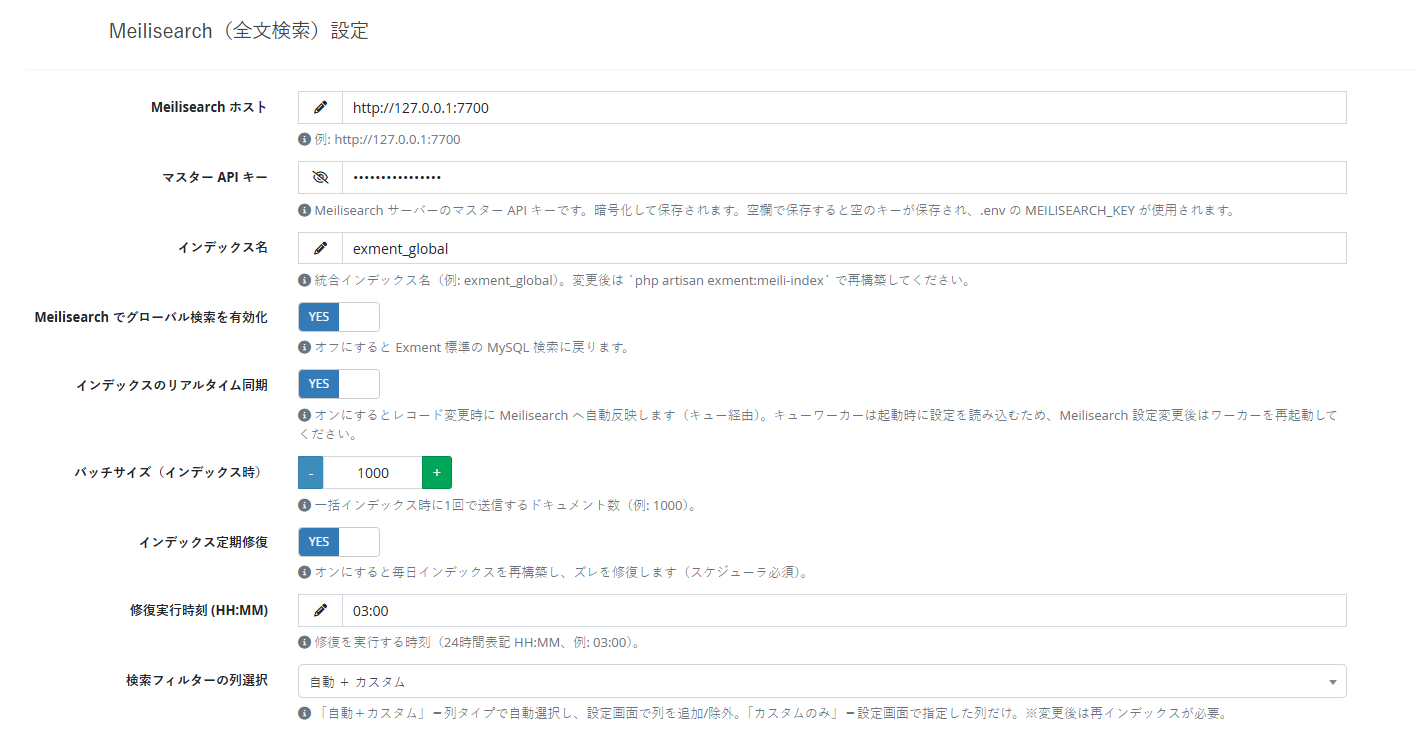
| Item | Value to set |
|---|---|
| Meilisearch Host | The connection destination of the Meilisearch server. When Meilisearch is on the same server as Exment, leave "http://127.0.0.1:7700". |
| Master API Key | The master key generated when installing the Meilisearch server. |
| Index name | Leave "exment_global". When multiple Exment installations use the same Meilisearch server, set a different name for each Exment. |
| Enable Global Search via Meilisearch | YES. This is the setting on the search side, so you can also turn it on after the creation of the index is completed. |
| Real-time index sync | YES. This is the setting on the update side, so the queue worker registered in step 3 is required. |
| Batch size (indexing) | Leave 1000. |
| Scheduled index repair | YES. The scheduler set in step 4 is required. |
| Repair time (HH:MM) | A time when the load is low, such as 03:00. |
| Search filter columns | Leave "Auto + Custom". |
The values saved on this screen are held in the database and take priority over the ".env". The Master API Key is stored encrypted.
These items can also be set in the ".env" instead of the screen. For details, please check Setting the items of the screen in the .env.
One index can be used by only one Exment installation. The Exment that uses an index first is recorded as its owner in an index named "(index name)__owner". (The recorded value is an identifier created from "APP_KEY" in the ".env".)
When multiple Exment installations use the same Meilisearch server, set a different "Index name" for each Exment. An index whose owner is recorded as another Exment cannot be used. For details, please check If it does not work properly.
Create the index
- Execute the following command to create the index from the contents of the database.
*Depending on the number of data, the process may take time.
php artisan exment:meili-index- Execute the following command to check the connection status with Meilisearch and the number of registered documents.
php artisan exment:meili-health3. Register the queue worker
Register the queue worker as a service in order to reflect updates of custom data in the index.
The queue worker needs to target the following two queues.
- default : This is a queue with light processing, which performs the sync of custom data one by one, the reflection of settings, and so on. (the default value of "MEILISEARCH_SYNC_QUEUE")
- meili-reindex : This is a queue with heavy processing, which recreates the index for each table. (the value set to "MEILISEARCH_REINDEX_QUEUE" in ".env settings")
*When "MEILISEARCH_REINDEX_QUEUE" is not set, the process for each table is also executed in the same queue as "MEILISEARCH_SYNC_QUEUE" (default value: default). In that case, the sync of custom data one by one has to wait until the heavy process finishes.
*If you have changed the settings of "MEILISEARCH_SYNC_QUEUE" or "MEILISEARCH_REINDEX_QUEUE", please change the contents of "--queue=" as well.
For Linux
- Execute the following command.
*"/var/www/exment" is the installation folder of Exment, and "/usr/bin/php" is the path of the php command. Please change them according to your environment.
sudo tee /etc/systemd/system/exment-meili-worker.service > /dev/null << 'EOF'
[Unit]
Description=Exment queue worker (Meilisearch sync)
After=network.target mysql.service

[Service]
User=www-data
Group=www-data
WorkingDirectory=/var/www/exment
ExecStart=/usr/bin/php artisan queue:work --queue=default,meili-reindex --max-time=3600 --tries=3
Restart=always
RestartSec=3

[Install]
WantedBy=multi-user.target
EOF- Execute the following command to enable automatic startup of the service and start the queue worker.
sudo systemctl daemon-reload
sudo systemctl enable --now exment-meili-worker- Execute the following command and confirm that the service is running.
systemctl status exment-meili-worker --no-pagerFor Windows
- Execute the following command.
*"C:\inetpub\exment" is the installation folder of Exment, and "C:\php\php.exe" is the path of the php command. Please change them according to your environment.
C:\nssm\nssm.exe install ExmentMeiliWorker C:\php\php.exe
C:\nssm\nssm.exe set ExmentMeiliWorker AppParameters "artisan queue:work --queue=default,meili-reindex --max-time=3600 --tries=3"
C:\nssm\nssm.exe set ExmentMeiliWorker AppDirectory C:\inetpub\exment
C:\nssm\nssm.exe set ExmentMeiliWorker AppExit Default Restart
C:\nssm\nssm.exe set ExmentMeiliWorker Start SERVICE_AUTO_START
C:\nssm\nssm.exe start ExmentMeiliWorker
4. Set the scheduler
When "MEILISEARCH_REPAIR_ENABLED" is set to true, the automatic index repair is executed at the time set in "MEILISEARCH_REPAIR_AT".
In order to execute this process, the setting of the scheduler is required. If you do not perform the setting, the automatic repair will not be executed.
*If you have already performed the setting of Task schedule, this step is not necessary.
For Linux
- Execute the following command.
sudo crontab -u www-data -l 2>/dev/null | { cat; echo "* * * * * cd /var/www/exment && php artisan schedule:run >> /dev/null 2>&1"; } | sudo crontab -u www-data -For Windows
- Execute the following command.
schtasks /create /tn "ExmentScheduler" /sc minute /mo 1 /ru SYSTEM /f /tr "C:\php\php.exe C:\inetpub\exment\artisan schedule:run""/f" is the option to overwrite without displaying a confirmation message, when a task with the same name is already registered.
Setting the items of the screen in the .env
The items of "Meilisearch (full-text search) settings" can also be set in the ".env" instead of the System settings screen, for example when the settings are deployed automatically. The setting keys are as follows.
| Item | Setting key of the ".env" |
|---|---|
| Meilisearch Host | MEILISEARCH_HOST |
| Master API Key | MEILISEARCH_KEY |
| Index name | MEILISEARCH_INDEX |
| Enable Global Search via Meilisearch | MEILISEARCH_GLOBAL_SEARCH |
| Real-time index sync | MEILISEARCH_REALTIME_SYNC |
| Batch size (indexing) | MEILISEARCH_BATCH_SIZE |
| Scheduled index repair | MEILISEARCH_REPAIR_ENABLED |
| Repair time (HH:MM) | MEILISEARCH_REPAIR_AT |
| Search filter columns | MEILISEARCH_FILTER_MODE ("Auto + Custom" is override, "Custom only" is manual) |
*The "Advanced settings" screen of System settings writes all of the above items to the database every time it is saved, even the items you did not change. After that, the values saved on the screen take priority, and the values in the ".env" are ignored for those items.
When you manage these items in the ".env", keep the following in mind.
- "Enable Global Search via Meilisearch", "Real-time index sync", "Scheduled index repair" and "Search filter columns" cannot be saved empty. Once the screen has been saved, these four items always use the value on the screen, so change them on the screen.
- "Meilisearch Host", "Master API Key", "Index name", "Batch size (indexing)" and "Repair time (HH:MM)" use the value in the ".env" again when they are saved empty on the screen.
- If the contents are not reflected even though you changed the ".env", check whether values are saved on the screen.
- The setting values other than the above can be set only in the ".env".
About the search accuracy
In Meilisearch, before performing a search, the process of splitting a sentence into words (tokenization) is performed.
When handling data of a language such as Japanese, the setting of "MEILISEARCH_LOCALES" is used in order to perform this process correctly.
- The default value is "jpn". When handling only Japanese, it is not necessary to write it.
- For the value, write the language codes of ISO-639-3 separated by commas. (Example: "jpn", "jpn,eng")
- When you leave it empty like "MEILISEARCH_LOCALES=", this setting is deleted from the index, and Meilisearch determines the language automatically.
- In order to use this setting, Meilisearch v1.10 or later is required.
- When you have changed the setting, please execute "php artisan exment:meili-settings". Since Meilisearch splits the words again automatically, it is not necessary to recreate the index.
"MEILISEARCH_LOCALES" and the dictionary settings (synonyms and stop words) work at different stages. Please use them in combination.
| Setting | Stage | Contents of the process |
|---|---|---|
| MEILISEARCH_LOCALES | Before | Splits a sentence into words. |
| Synonyms and stop words | After | Performs the expansion of synonyms and the exclusion, against the split words. |
Administration screens
The screens related to Meilisearch are as follows.
*The "admin" part of the URL differs depending on the setting of "ADMIN_ROUTE_PREFIX". For details, please check Change / delete "admin" included in the URL.
| Screen | URL | Contents |
|---|---|---|
| System settings | /system | From "Meilisearch (full-text search) settings" in "Advanced settings", set the connection destination, the master key and each flag. |
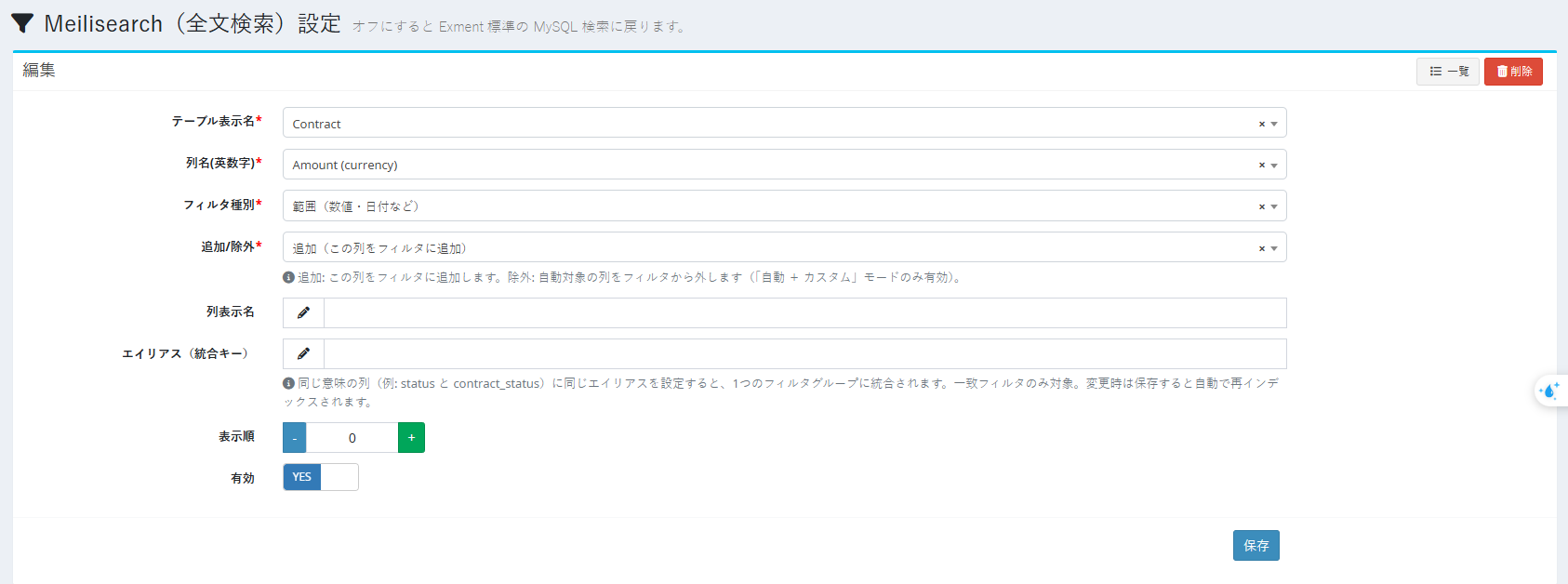
| Search Filter Setting | /meili-filter | Set the narrowing-down conditions displayed in the sidebar of the search result page. |
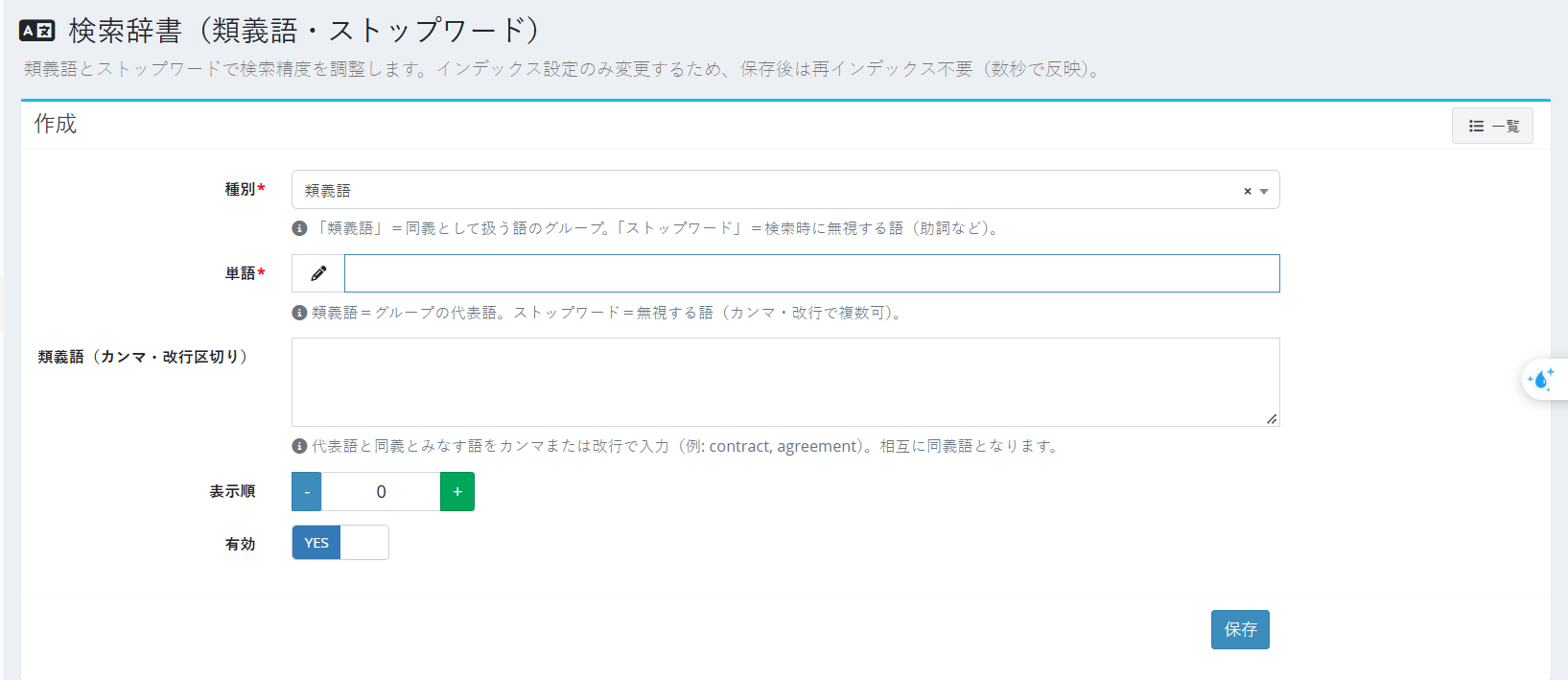
| Search Dictionary Setting | /meili-dictionary | Set synonyms and stop words. |
*"Search Filter Setting" and "Search Dictionary Setting" are not displayed in the menu by default. Access them directly from the URLs above, or add them as system menus in Menu settings. These two are offered as choices in the menu settings only when "MEILISEARCH_GLOBAL_SEARCH" is true.
On the "Search Filter Setting" screen, select a table and a column, and set the filter type (equality or range), add/exclude, alias, and so on.
On the "Search Dictionary Setting" screen, register the type (synonym or stop word) and the words.
Operation check
Log in to Exment, enter a word in the search bar at the top of the page, and perform a search.
Confirm that the search results are displayed.
After creating or updating custom data, search again and confirm that the updated contents are reflected in the search results.
*If they are not reflected, please check whether the queue worker is running.You can also search from the command line. This queries Meilisearch directly, without the user permission filter of the screen, and shows the response time, so it tells whether a problem is in Meilisearch itself or on the screen.
php artisan exment:meili-search "keyword" --limit=5 --highlight --facets*Specify "--table=(table name)" to search only one table.
Functions of the search screen
When "MEILISEARCH_GLOBAL_SEARCH" is true, the following functions can be used on the search result page.
Narrowing down : In the sidebar, narrow down the search results by table, column values, date and number ranges, and so on. The target columns can be changed on the "Search Filter Setting" screen.
Sorting : Sort by "Relevance", "Newest first" or "Oldest first".
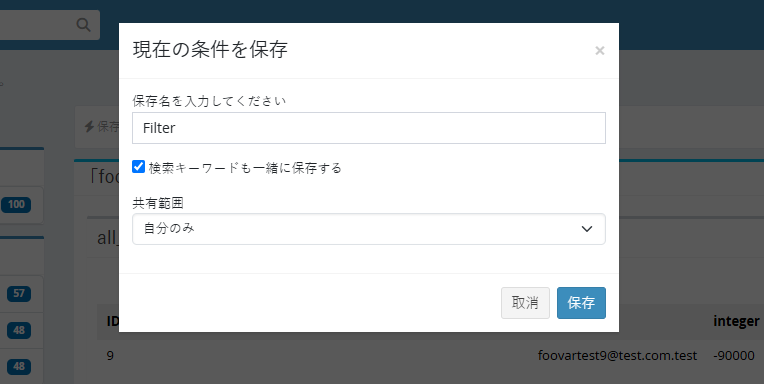
Saving search conditions : From "Save current conditions", save the narrowing-down conditions (and optionally the search keyword), and call them from "Saved searches" from the next time on.
- Select the sharing scope from "Only me", "Role group", "Organization" or "All users". Sharing with "All users" can be performed only by the system administrator.
- The number of conditions that one user can save is up to "MEILISEARCH_SAVED_SEARCH_LIMIT" (default value 50).
Export : Output the search results as CSV or XLSX for each table. If the number of export targets reaches the limit (the smaller of "MEILISEARCH_PERMISSION_SCAN_CAP" (default value 1000) and the "maxTotalHits" setting of the index), an error occurs, so please narrow down the search conditions.
*The number is judged by all search results (hits) before narrowing down by view permission. Therefore, an error may occur even if the data you can view is less than the limit.
Recreating and repairing the index
These are the steps for repairing the index, such as when a difference occurs between the database and the index, or when a large amount of data has been imported or deleted.
Repairing the difference
The "exment:meili-reconcile" command performs the following two processes.
- For the tables that are the target of the index, it adds the missing documents and deletes the unnecessary documents (data already deleted from the database).
- It deletes from the index all the documents of the tables that are no longer the target of the index (those whose "Search Enabled" was changed to NO, those that no longer have a free word search column, those whose table itself was deleted, and so on).
*When executed with "--table" specified, this process is not performed.
*With this command, documents are deleted from the index.
When you want to check the contents to be deleted in advance, please execute it with "--dry-run" specified.
- Execute the following command to check the difference between the database and the index. When "--dry-run" is specified, only the check is performed and the repair is not performed.
php artisan exment:meili-reconcile --dry-run- Execute the following command to repair the difference.
php artisan exment:meili-reconcile- When repairing only a specific table, specify "--table".
php artisan exment:meili-reconcile --table=(table name)Recreating the index
- When recreating the whole index, execute the following command.
When "--fresh" is specified, all documents are recreated, so a confirmation message is displayed at execution.
*While the index is being recreated, searches can still be performed with the existing index. When the creation is completed, it switches to the new index.
php artisan exment:meili-index --freshWhen executing it without displaying the confirmation message, such as in a batch process, please specify "--force" as well.
In an environment where the confirmation message cannot be displayed (such as cron), the command results in an error if "--force" is not specified.php artisan exment:meili-index --fresh --force
- Custom data updated while the index was being recreated is not included in the new index. After completion, execute the following command to repair the difference.
php artisan exment:meili-reconcileReflecting only the settings
- When you save synonyms and stop words on the "Search Dictionary Setting" screen, the settings are reflected in the index automatically through the queue. It is not necessary to execute the command.
*If the queue worker has stopped, they are not reflected. In that case, please execute the following command. - When you have changed "MEILISEARCH_LOCALES", "MEILISEARCH_PERMISSION_SCAN_CAP" or "MEILISEARCH_MAX_FACET_VALUES" in the ".env", please execute the following command. The settings can be reflected without recreating the index.
*When "--show" is specified, the current setting contents are displayed.
php artisan exment:meili-settings
php artisan exment:meili-settings --show
When updating the system or changing the settings
Since the queue worker is a long-lived process, it will not reflect changes in the code or the settings unless it is restarted.
When you have updated Exment, or when you have changed the settings of Meilisearch (the setting values starting with "MEILISEARCH_" in the ".env", or "Meilisearch (full-text search) settings" in "System Settings (Advanced settings)"), execute the following command and restart the queue worker.
- For Linux
sudo systemctl restart exment-meili-worker- For Windows
C:\nssm\nssm.exe restart ExmentMeiliWorkerIf it does not work properly
| Symptom | Possible cause |
|---|---|
| The contents are not reflected even though you changed the ".env" | The value saved in "Admin Settings > System Settings (Advanced settings)" takes priority. Please check the settings on the screen. |
| The queue worker does not start | The tables for the queue (jobs and failed_jobs) have not been created. Please refer to "Execute the commands" in "2. Exment settings" and create the tables. |
| The search results do not change even after updating data | "MEILISEARCH_REALTIME_SYNC" is false, or the queue worker has stopped. Please check the status of the service, and the failed jobs with "php artisan exment:meili-health --failed". |
| The search results do not change even after changing the column settings | The process of recreating the index has not been completed. Please check whether "gave up after 3 attempts" is output to the log, and execute "php artisan exment:meili-index". |
| "reindex ... skipped: the queue connection is 'sync'" is output to the log | Since "QUEUE_CONNECTION" is sync, the process was given up. Please execute "php artisan exment:meili-index", or change the queue to database or redis and execute the queue worker. |
| "Too many results to export (limit N)" is displayed at export | The number of search results has reached the limit (the smaller of "MEILISEARCH_PERMISSION_SCAN_CAP" (default value 1000) and the "maxTotalHits" setting of the index). The number is judged by the hits before narrowing down by view permission. Since it is treated as an error instead of reducing the number of records, please narrow down the search conditions, or increase the setting value and then execute "php artisan exment:meili-settings". |
| Some results are not displayed in a Japanese search (such as when kanji and katakana are consecutive) | The tokenization setting is not applied. Please check the setting contents with "php artisan exment:meili-settings --show", and check whether "MEILISEARCH_LOCALES" is empty and whether Meilisearch is v1.10 or later. |
| There is a difference in the data after an import or a bulk deletion, or a table whose "Search Enabled" was changed to NO is still displayed in the search results | Documents are missing from, or remain in, the index. Please execute "php artisan exment:meili-reconcile" without specifying "--table". |
| The automatic repair is not executed | The setting of the scheduler has not been performed, or "MEILISEARCH_REPAIR_ENABLED" is false. |
| The Meilisearch service repeats starting and stopping (Linux) | "WorkingDirectory=/var/lib/meilisearch" is not described in the service configuration file. |
| "Meilisearch index '(index name)' belongs to another Exment installation" is output by a command or to the log | The configured index is used by another Exment as its owner. This occurs when another Exment uses the same index name on the same Meilisearch server, or when "APP_KEY" in the ".env" has been changed. In this state, the "exment:meili-index" and "exment:meili-reconcile" commands result in an error, and data updates are not reflected in the index. Searches are performed using the database. Change "Index name" in "System Settings (Advanced settings)" to a name not used by any other Exment and save it, then execute "php artisan exment:meili-index" and restart the queue worker. If the cause is a change of "APP_KEY", restoring the original "APP_KEY" value also solves it. |
- For Linux, you can check the error contents of Meilisearch with the following command.
sudo journalctl -u meilisearch -n 50 --no-pager- You can check the number of jobs that failed to sync with the following command.
php artisan exment:meili-health --failed