
Update composer
This is the procedure for updating composer.
On October 2020, composer ver2 was released.
composer is a library used for installation / update of Exment.
In ver2, the following measures are implemented.
- Significant improvements in both speed and memory usage
- require/remove and partial updates are much faster
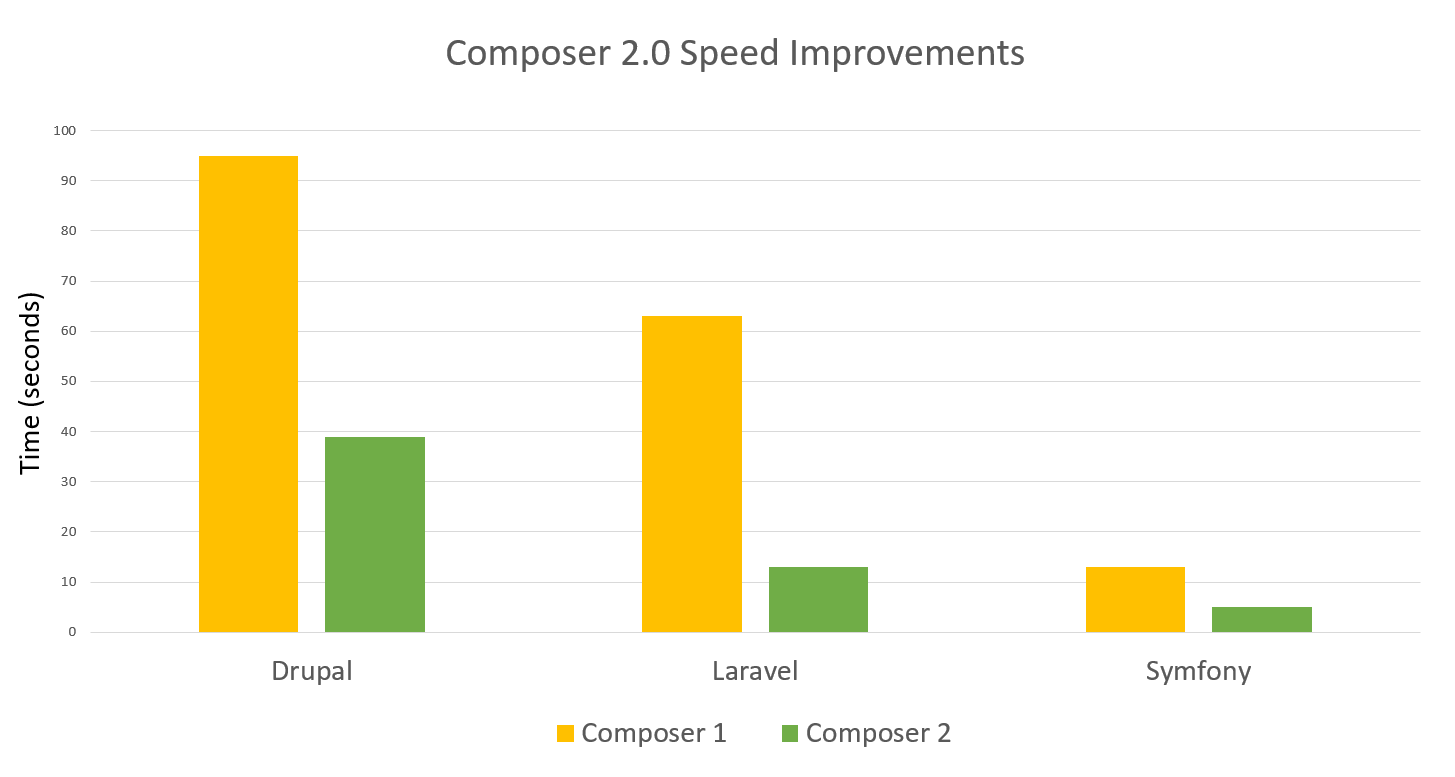
Quote:
https://blog.packagist.com/composer-2-0-is-now-available
https://qiita.com/ucan-lab/items/289009ffe5bb417c808e
Exment has also verified the installation / update with composer2 and confirmed that it can be implemented without any problems.
Although it depends on the environment, it is recommended to update to composer2 because it can be expected to improve the memory usage excess that occurred frequently at composer1.
Update procedure
There are several steps required to update to composer2.
*As much as possible, please carry out the same procedure in the development environment and verify it before carrying out in the production environment.
Check the current composer version
- Execute the current composer version with the following command. (It doesn't matter which folder you use.)
composer --versionIf the result of the above command is already composer2.XX and the Exment update has been completed normally without any problems, the composer update has already been completed, so the subsequent steps Is unnecessary.
If it is composer1.X.X, follow the steps below.
Check and update the current laravel / framework version
Check the version of laravel / framework used by Exment. *If multiple Exments are installed on the same server, perform the following procedure for all Exments.
- Execute the following command in the root folder of Exment.
php artisan --version
# You will see a result similar to the following
# Laravel Framework 5.6.39
If the above result is version 5.6.40 or higher, you do not need to do anything.
If the above result is less than version 5.6.40, use the following command to update the entire project.
composer updatecomposer update
- Update your current composer version to 2.X.X.
# Please do one of the following
composer self-update -–2
composer selfupdate -–2- If something goes wrong after the update, you can roll back to version 1.X.X with the following command.
However, please execute the following command in a path other than the Exment folder. If you run it inside the Exment folder, you will get an error.
composer self-update -–1
composer selfupdate -–1